Custom API Keys (Using Downstream Service Tokens)
Custom API Keys Overview
Instead of managing separate uag_ API keys, you can now use your existing downstream service tokens (like LiteLLM's default sk- or Antropic's sk-ant-apitokens) directly as gateway authentication tokens. This eliminates the need for dual authentication and simplifies your Claude Code configuration.
Problem This Solves
Previously, you needed:
- LiteLLM API key (
sk-STk......) for the downstream service - Gateway API key (
uag_xxx...) for the gateway authentication - HTTP proxy to inject the gateway API key header
Now you can use just one key - your existing service token!
Custom API Keys How It Works
When creating an API key in the gateway, you can choose to:
Option 1: Generate new key (default)
- Gateway generates a
uag_prefixed key - You use this key in the
X-API-Keyheader
Option 2: Use existing service token (new!)
- You provide your existing service token (e.g.,
sk-STk......) - Gateway stores a hash of this token
- You continue using your existing
ANTHROPIC_AUTH_TOKEN - Gateway validates the token from the
Authorization: Bearerheader
Creating a Custom API Key
Custom Keys Via Web UI
- Go to User Groups → View your group
- Click + Create API Key
- Enter a name (e.g., "Claude Code Token")
- Check the box: ☑ "Use existing service token (e.g., LiteLLM sk-xxx key)"
- Enter your service token:
sk-STk...... - Click Create Key
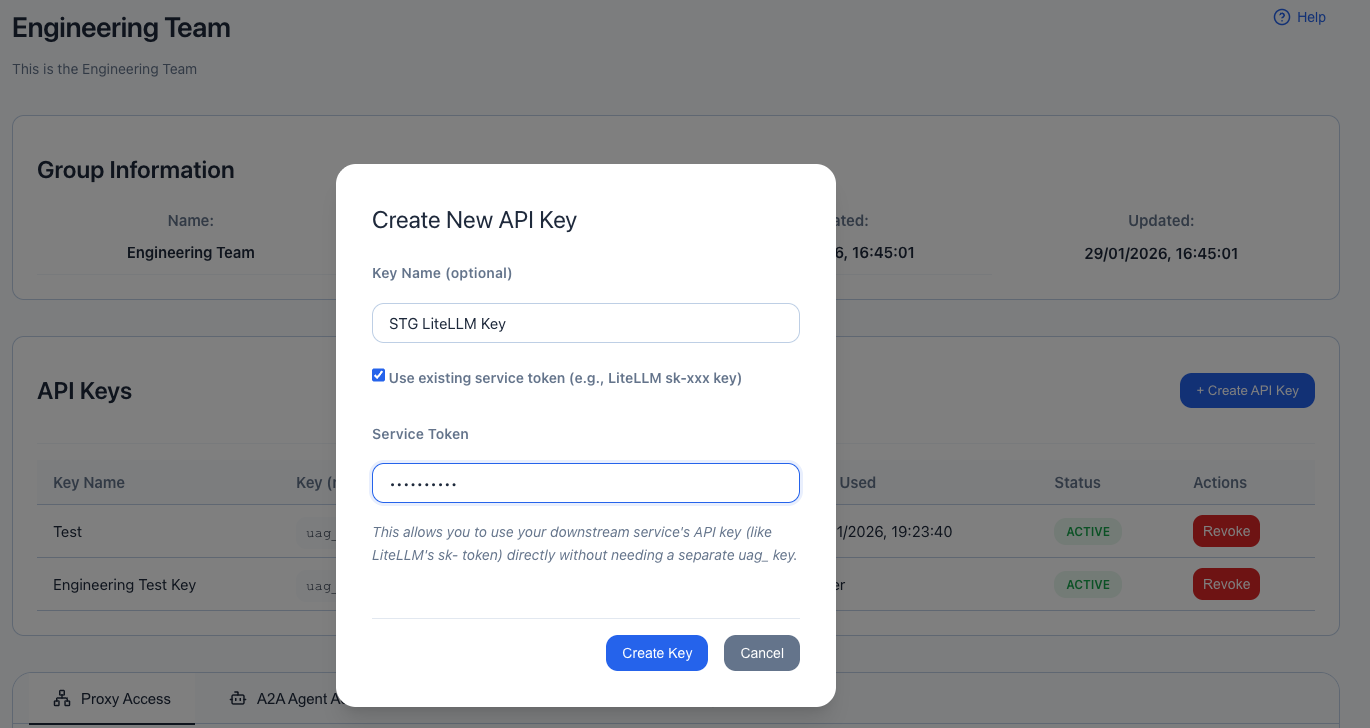
The gateway will:
- Hash and store your service token securely
- Return the token back to you (for confirmation)
- Allow authentication using
Authorization: Bearer sk-xxx...
Custom Keys Via API
curl -X POST http://localhost:8080/api/v1/api-keys \
  -H "Content-Type: application/json" \
  -H "Authorization: Bearer <your-admin-token>" \
  -d '{
    "name": "Claude Code Token",
    "user_group_id": 1,
    "description": "LiteLLM token for Claude Code",
    "custom_key": "sk-STk......"
  }'
Response:
{
  "success": true,
  "data": {
    "api_key": {
      "id": 2,
      "name": "Claude Code Token",
      "key_prefix": "sk-STkVM",
      "user_group_id": 1,
      "active": true,
      "created_at": "2025-10-23T12:00:00Z"
    },
    "key": "sk-STk......",
    "message": "API key created successfully. Save this key securely - it will not be shown again!"
  }
}
Claude Code Configuration
Before (With Proxy)
# Needed separate proxy
export ANTHROPIC_BASE_URL=http://localhost:8034/  # Proxy on 8034
export ANTHROPIC_AUTH_TOKEN="sk-STk......"
After (Direct)
# Direct to gateway - no proxy needed!
export ANTHROPIC_BASE_URL=http://localhost:8033/  # Gateway on 8033
export ANTHROPIC_AUTH_TOKEN="sk-STk......"
That's it! No extra proxy needed.
How Authentication Works
Header Extraction Priority
The gateway checks headers in this order:
X-API-Keyheader (checked first)X-API-Key: uag_abc123...Authorization: Bearerheader (checked second)Authorization: Bearer sk-STk......Authorization: ApiKeyheader (checked third)Authorization: ApiKey uag_abc123...
Only ONE token is extracted - whichever is found first.
Standard Gateway Key (uag_)
Client Request:
━━━━━━━━━━━━━━━━━━━━━━━━━━━━━━━━━━━━━━━━━━━━━
X-API-Key: uag_abc123def456...
Authorization: Bearer sk-litellm-token  ← For downstream service
━━━━━━━━━━━━━━━━━━━━━━━━━━━━━━━━━━━━━━━━━━━━━

Gateway Processing:
━━━━━━━━━━━━━━━━━━━━━━━━━━━━━━━━━━━━━━━━━━━━━
1. Extract: X-API-Key found → "uag_abc123def456..."
2. Hash: sha256("uag_abc123def456...") → "hash_xyz..."
3. Lookup: api_keys WHERE key_hash = "hash_xyz..."
4. Validate: Active? User group active? Has proxy access?
5. Forward to LiteLLM with both headers preserved:
   - X-API-Key: uag_abc123def456...
   - Authorization: Bearer sk-litellm-token
━━━━━━━━━━━━━━━━━━━━━━━━━━━━━━━━━━━━━━━━━━━━━
Custom Service Token (sk-) - NEW!
Client Request (Claude Code):
━━━━━━━━━━━━━━━━━━━━━━━━━━━━━━━━━━━━━━━━━━━━━
Authorization: Bearer sk-STk......
Content-Type: application/json
━━━━━━━━━━━━━━━━━━━━━━━━━━━━━━━━━━━━━━━━━━━━━

Gateway Processing:
━━━━━━━━━━━━━━━━━━━━━━━━━━━━━━━━━━━━━━━━━━━━━
1. Extract: X-API-Key not found
2. Extract: Authorization Bearer found → "sk-STk......"
3. Hash: sha256("sk-STk......") → "hash_abc..."
4. Lookup: api_keys WHERE key_hash = "hash_abc..."
5. Found! API Key registered as "Claude Code Token"
6. Validate: Active? User group active? Has proxy access?
7. Forward to LiteLLM with SAME Authorization header:
   - Authorization: Bearer sk-STk......
━━━━━━━━━━━━━━━━━━━━━━━━━━━━━━━━━━━━━━━━━━━━━

LiteLLM receives:
━━━━━━━━━━━━━━━━━━━━━━━━━━━━━━━━━━━━━━━━━━━━━
Authorization: Bearer sk-STk......  ← Same token!
Content-Type: application/json
━━━━━━━━━━━━━━━━━━━━━━━━━━━━━━━━━━━━━━━━━━━━━Magic: The same token (sk-STk......) is used for:
- Gateway authentication - Validates against database (hash lookup)
- LiteLLM authentication - Forwarded unchanged to service
No dual tokens, no extra proxy, no header injection needed!
Custom API Keys Security
Custom Key Token Storage
- Never stored in plain text
- SHA-256 hash stored in database
- Same security as standard
uag_keys - Cannot be retrieved after creation (only hash is stored)
Token Validation
- Extract token from
Authorization: Bearer <token> - Hash the token with SHA-256
- Look up hash in
api_keystable - Validate:
- Key is active
- Key hasn't expired
- User group is active
- User group has proxy access
- Allow or deny request
Token Display
- Prefix shown:
sk-STkVM(first 8 characters) - Full token: Only shown once at creation
- Masked in UI:
sk-STkVM••••••••
Custom API Keys Use Cases
1. Claude Code with LiteLLM
# 1. Create API key with your LiteLLM token via UI
# 2. Configure Claude Code
export ANTHROPIC_BASE_URL=http://localhost:8033/
export ANTHROPIC_AUTH_TOKEN="sk-STk......"
export ANTHROPIC_MODEL="custom--us.anthropic.claude-sonnet-4-5-20250929-v1"

# 3. Use Claude Code normally - authentication handled automatically!
2. Multiple Environments with Same Token
# Development
# User Group: Development Team
# Custom Key: sk-dev-token-123

# Production
# User Group: Production Team
# Custom Key: sk-prod-token-456

# Same token format, different user groups = different proxy access
3. Team-Based Access Control
# Team A has access to: OpenAI Proxy, custom-LiteLLM
# Team A uses: sk-team-a-token

# Team B has access to: DeepWiki MCP, Test MCP
# Team B uses: sk-team-b-token

# Same interface, different access rights
Advantages
✅ Simplified Configuration
- No extra proxy needed
- One token to manage
- No header injection
- Direct connection
✅ Backward Compatible
- Existing
uag_keys still work - No breaking changes
- Optional feature
- Mix and match key types
✅ Same Security
- SHA-256 hashing
- Same validation flow
- Same access control
- Same audit trail
✅ Better UX
- Familiar token format (sk-, api-, etc.)
- No dual authentication
- Works with existing tools
- Simpler troubleshooting
Limitations
Cannot Modify Token
Once created, you cannot change the custom token value. You must:
- Revoke the old API key
- Create a new API key with the new token
Token Must Be Unique
- Each token can only be registered once
- Attempting to register the same token twice will fail
- This prevents token conflicts
Still Hashed
- The custom token is still hashed (SHA-256)
- Cannot retrieve the original token after creation
- Same security model as standard keys
Custom API Keys API Reference
Create API Key with Custom Token
Endpoint: POST /api/v1/api-keys
Request Body:
{
  "name": "My Custom Token",
  "user_group_id": 1,
  "description": "Optional description",
  "custom_key": "sk-your-service-token-here",
  "expires_in_days": 90
}Response:
{
  "success": true,
  "data": {
    "api_key": {
      "id": 1,
      "name": "My Custom Token",
      "key_prefix": "sk-your-s",
      "user_group_id": 1,
      "user_group_name": "My Team",
      "description": "Optional description",
      "active": true,
      "expires_at": "2026-01-21T12:00:00Z",
      "is_expired": false,
      "last_used_at": null,
      "request_count": 0,
      "created_at": "2025-10-23T12:00:00Z",
      "updated_at": "2025-10-23T12:00:00Z"
    },
    "key": "sk-your-service-token-here",
    "message": "API key created successfully. Save this key securely - it will not be shown again!"
  }
}
Create Standard API Key (No Custom Token)
Request Body:
{
  "name": "My Standard Key",
  "user_group_id": 1,
  "description": "Generated key"
}Response:
{
  "success": true,
  "data": {
    "api_key": { ... },
    "key": "uag_abc123def456...",
    "message": "API key created successfully..."
  }
}
Custom API Keys Testing
1. Create Custom API Key
curl -X POST http://localhost:8080/api/v1/api-keys \
  -H "Content-Type: application/json" \
  -d '{
    "name": "Test Token",
    "user_group_id": 1,
    "custom_key": "sk-test-123456"
  }'
2. Test Authentication
# Using custom token
curl -H "Authorization: Bearer sk-test-123456" \
     http://localhost:8033/v1/models

# Should return 200 OK if user group has proxy access
3. Verify Access Control
# Try accessing a proxy you don't have access to
curl -H "Authorization: Bearer sk-test-123456" \
     http://localhost:8999/some-endpoint

# Should return 403 Forbidden
Custom API Keys Troubleshooting
Issue: 401 Unauthorized with custom token
Causes:
- Token hash doesn't match database
- API key is revoked
- API key has expired
- User group is inactive
Solution:
- Verify the token is exactly correct (no extra spaces)
- Check API key status in UI
- Verify user group is active
- Try creating a new API key
Issue: Works with curl but not Claude Code
Causes:
- Claude Code may be modifying the Authorization header
- Base URL not set correctly
Solution:
- Verify base URL:
http://localhost:8033/(with trailing slash) - Test with curl first to confirm token works
- Check Claude Code logs for actual headers sent
Issue: Token shows as "Unknown" in UI
Cause: Non-standard token format
Solution: This is expected for custom tokens. The UI will show:
- Prefix: First 8 characters (e.g.,
sk-test-) - Masked:
sk-test-••••••••
Migration Guide
From Proxy Setup to Direct
Before (with nginx/Python proxy):
# Stop the proxy
pkill -f claude-proxy.py
# or
brew services stop nginx

# Update environment
export ANTHROPIC_BASE_URL=http://localhost:8033/  # Change port

# Create custom API key via UI or API

# Restart Claude Code - it will now work directly!After:
- ✅ No proxy process running
- ✅ Direct connection to gateway
- ✅ Same authentication experience
- ✅ Simpler troubleshooting
Custom Keys See Also
- API Key Authentication Guide
- Claude Code Proxy Setup (now optional!)
- User Groups Management - See OAuth User Access Control section
- Unified Web API