MCP Vulnerability Scanner
The AI Security Gateway includes a comprehensive vulnerability scanner specifically designed for Model Context Protocol (MCP) servers. This scanner identifies security weaknesses, configuration issues, and potential vulnerabilities in your MCP deployments.
Overview
The MCP Vulnerability Scanner provides:
- Automated Security Assessment: Comprehensive vulnerability scanning of MCP server implementations
- Real-time Analysis: On-demand scanning with immediate results
- Historical Tracking: View previous scan results and track security improvements over time
- Detailed Reporting: Comprehensive vulnerability reports with severity ratings and remediation guidance
- Integration Ready: Scan results integrate with the alert system and audit logging
Accessing the Scanner
To access the MCP Vulnerability Scanner:
- Navigate to Security in the main menu
- Select MCP Security from the dropdown
- Click on the "Vulnerability Scan" tab
Running a Vulnerability Scan
Step 1: Select Target MCP Server
The scanner interface provides a dropdown list of all configured MCP servers in your AI Security Gateway deployment.
Available Options:
- All currently configured MCP proxy instances
- Server status indicators (online/offline)
- Last scan timestamp (if previously scanned)
Step 2: Review Previous Results (Optional)
When you select an MCP server from the dropdown:
- Previous scan results are automatically displayed (if available)
- Scan timestamp shows when the last assessment was performed
- Summary statistics provide a quick security overview
- Vulnerability counts broken down by severity level
This allows you to quickly assess whether a new scan is needed or review historical security posture.
Step 3: Start New Scan
Click the "Start Scan" button to initiate a new vulnerability assessment:
- Real-time Progress: Live updates as the scan progresses
- Comprehensive Analysis: Tests multiple vulnerability categories
- Automatic Documentation: Results are saved for future reference
- Integration Updates: New findings trigger alerts and audit entries
Vulnerability Scan Results
The scanner provides detailed results showing security findings across multiple categories:
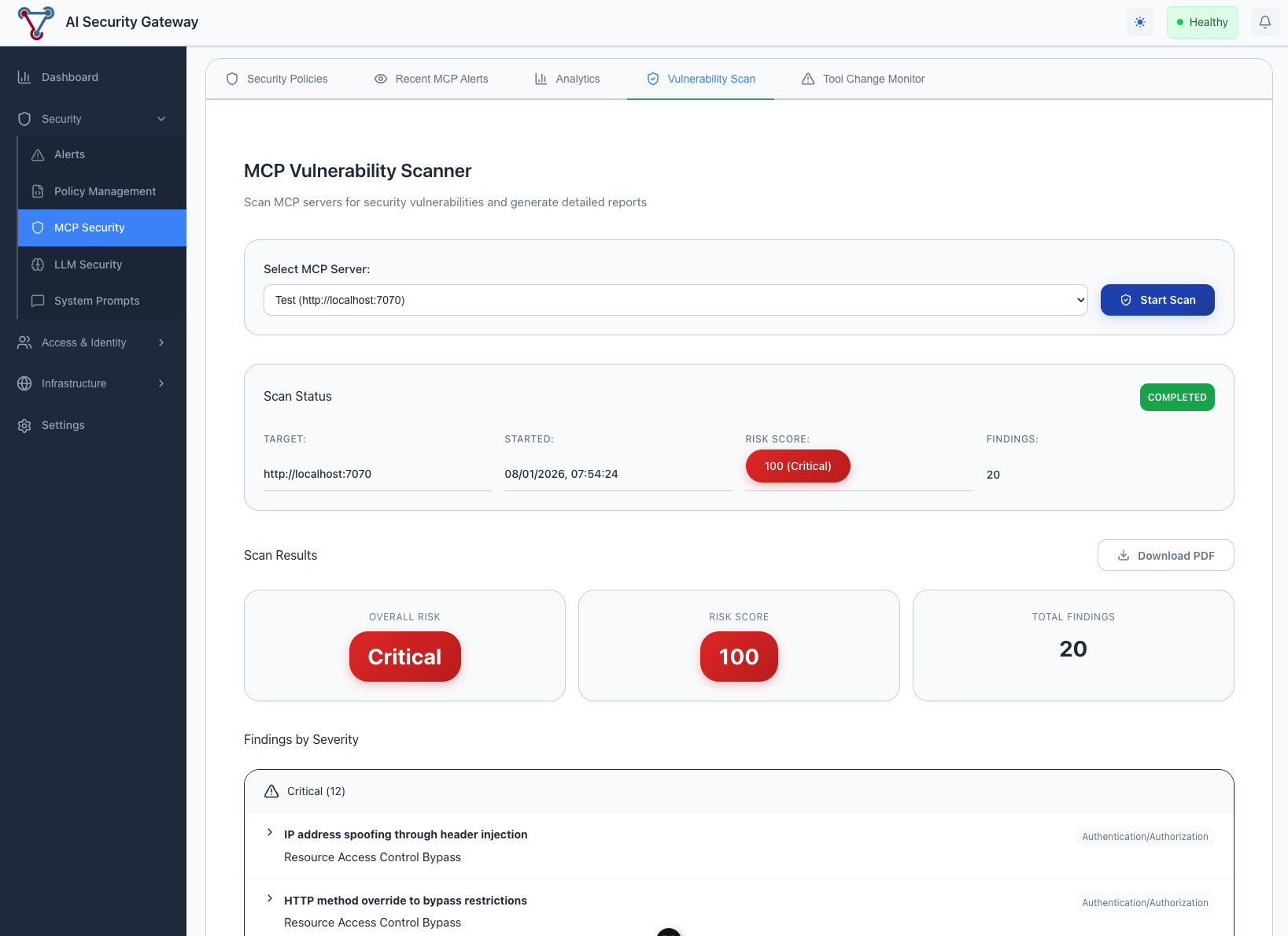
Scan Results Include:
Security Categories Assessed:
- Input Validation: SQL injection, command injection, path traversal
- Authentication & Authorization: Access control weaknesses
- Data Exposure: Information leakage and sensitive data handling
- Configuration Security: Server hardening and secure defaults
- Transport Security: TLS configuration and secure communications
- Resource Management: DoS protection and resource limits
Vulnerability Details:
- Severity Rating: Critical, High, Medium, Low
- CVE References: Links to known vulnerabilities when applicable
- Evidence: Specific examples of vulnerable code or configurations
- Remediation Guidance: Step-by-step instructions to fix identified issues
- Risk Assessment: Business impact and exploitation likelihood
Scan Metadata:
- Scan Duration: Time taken to complete the assessment
- Coverage Statistics: Percentage of server functionality tested
- Scan Timestamp: When the assessment was performed
- Scanner Version: Version of vulnerability definitions used
Understanding Scan Results
Severity Levels
Critical (Score: 9.0-10.0)
- Immediate security risk
- Remote code execution possible
- Immediate attention required
High (Score: 7.0-8.9)
- Significant security weakness
- Potential for data compromise
- Should be addressed quickly
Medium (Score: 4.0-6.9)
- Moderate security concern
- May facilitate other attacks
- Address during next maintenance window
Low (Score: 0.1-3.9)
- Minor security improvement
- Defense-in-depth enhancement
- Address when resources permit
Common Vulnerability Categories
Input Validation Issues:
- Unvalidated user inputs
- Missing sanitization
- Injection attack vectors
Authentication Problems:
- Weak credential handling
- Session management flaws
- Authorization bypasses
Configuration Weaknesses:
- Insecure default settings
- Missing security headers
- Overprivileged access
Troubleshooting
Common Issues
Scan Fails to Start:
- ✅ Verify MCP server is online and accessible
- ✅ Check network connectivity between scanner and target
- ✅ Ensure proper authentication credentials are configured
- ✅ Review firewall rules and port accessibility
Incomplete Scan Results:
- ✅ Check for timeout issues with slow-responding servers
- ✅ Verify scanner has sufficient permissions
- ✅ Review target server logs for connection issues
- ✅ Ensure adequate system resources for scanning
False Positives:
- ✅ Review vulnerability evidence carefully
- ✅ Verify findings in a test environment
- ✅ Update scanner definitions if needed
- ✅ Document legitimate exceptions for future reference
Scanner Limitations
Important Considerations:
- Scans test externally visible functionality only
- Cannot detect application-specific business logic flaws
- Results depend on server responsiveness during scan
- Some vulnerabilities may require manual verification
- Currently limited to access - Authenticate MCP Servers may fail scans for now (WIP)