Security Policy Overview Guide
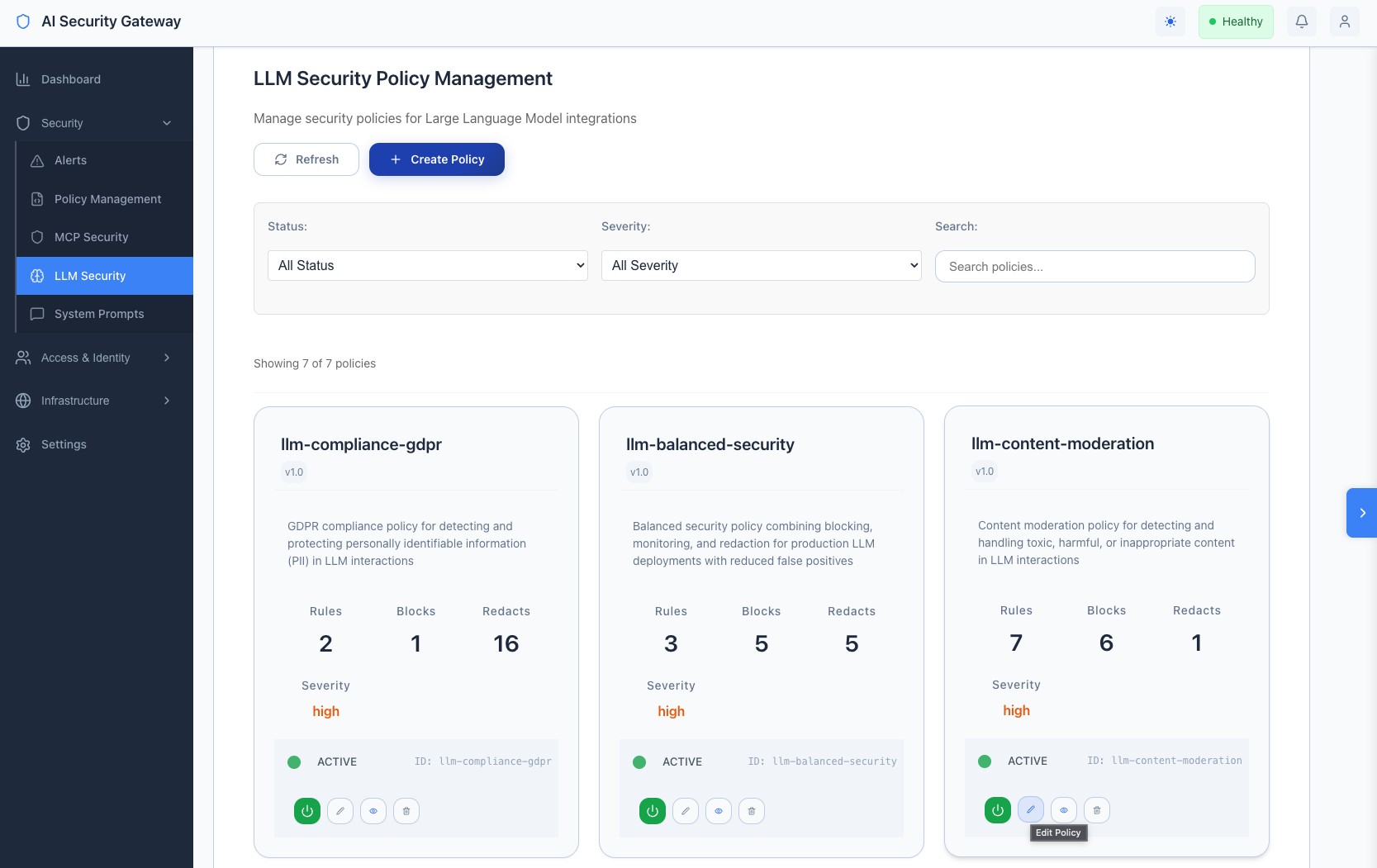
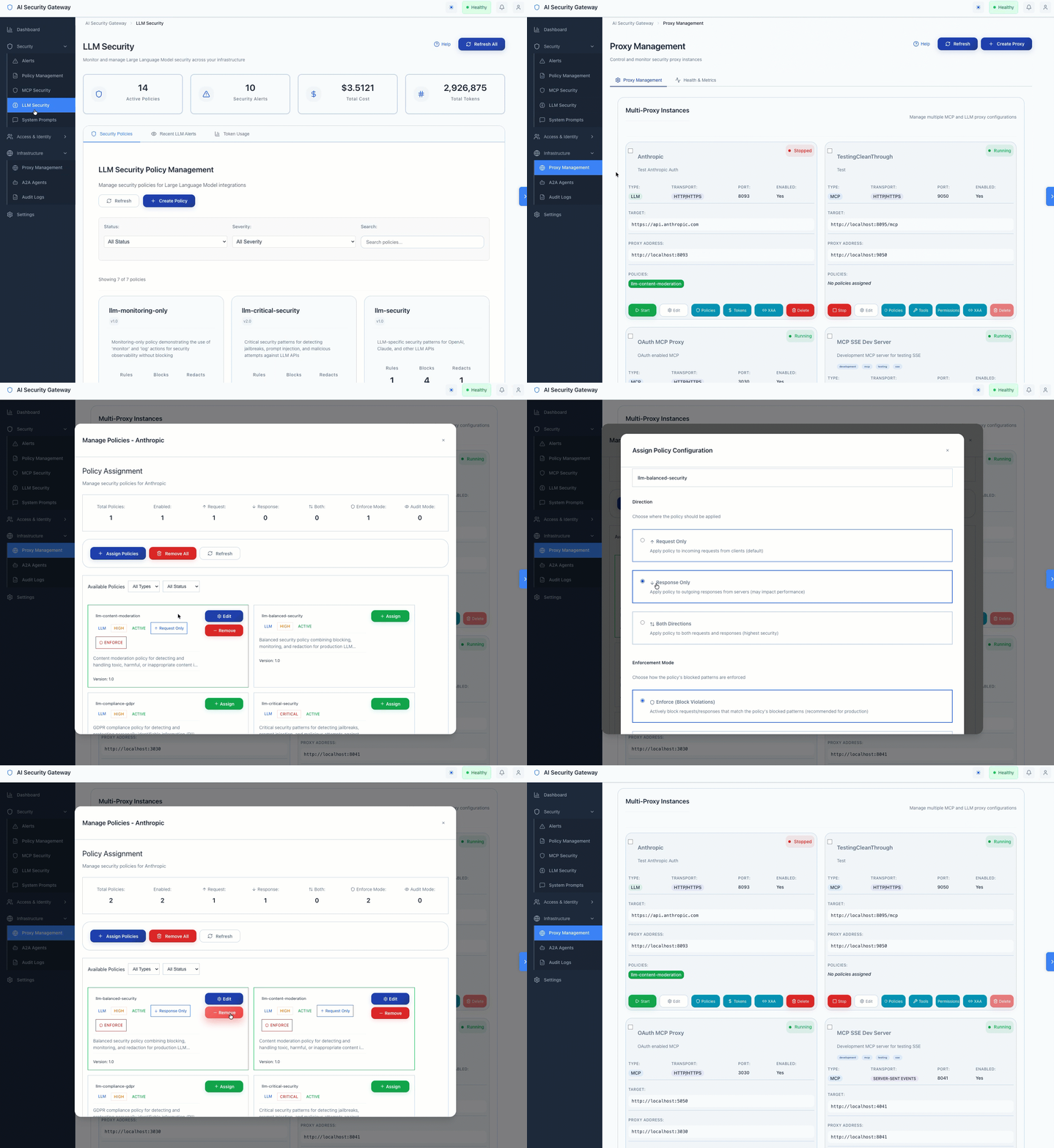
This guide provides a high-level overview of all available security policies (our form of Guardrails) in the AI Security Gateway. Learn what each policy does, when to use it, and how to manage them through the web interface.
What Are Security Policies?
Security policies are sets of rules that protect your LLM and MCP (Model Context Protocol) services from threats. Policies automatically apply to all traffic passing through the gateway, providing:
- Blocking - Stop dangerous requests before they reach your services
- Monitoring - Track suspicious activity for investigation
- Logging - Record events for security analysis
- Redaction - Replace sensitive information with placeholders
- Unmasking - Automatically restore original sensitive data in responses (when enabled)
All policies are managed through the web interface - no code changes required.
Policy Management Overview
The gateway includes default policies you can use immediately, plus tools to create custom policies:
- Default Policies - Pre-configured security policies for common use cases
- Policy Templates - Starting points for creating custom policies
- Pattern Library - Pre-built detection patterns (PII, Toxicity, Prompt Injection)
- Policy Builder - Interactive form for creating and editing policies
- Policy Testing - Test policies against sample content before deployment
Available Policy Types
The gateway supports two types of policies:
- LLM Policies - Protect Large Language Model APIs (OpenAI, Claude, Google AI, etc.)
- MCP Policies - Protect Model Context Protocol servers
Custom Policy Creation
You can create and customize policies through the web interface. The gateway provides flexible policy management without relying on third-party Guardrail providers. See the Custom Policies Guide for detailed instructions.
LLM Security Policies
These policies protect your LLM API endpoints from prompt injection, jailbreaking, and other AI-specific attacks.
llm-security.json
Basic LLM Protection
- Detects basic prompt injection attempts
- Best for getting started, low-risk environments, and testing
- Lightweight with minimal overhead
Example: Small internal tools where basic protection is sufficient.
llm-critical-security.json
Comprehensive Jailbreak & Attack Detection
- 162+ detection patterns for maximum protection
- Detects prompt injection, jailbreaking, DAN attacks, system prompt manipulation
- Blocks malicious code generation, PII extraction, and credential theft
- Best for production environments and public-facing applications
Example: Customer-facing chatbots requiring maximum security against jailbreaking and data extraction.
llm-data-redaction.json
Sensitive Data Protection
- Detects and redacts 44+ types of sensitive data (API keys, credentials, credit cards, PII)
- Replaces with safe placeholders:
[AWS_SECRET_KEY_REDACTED],[CREDIT_CARD_REDACTED] - Unmasking support: Enable "Unmask for user" to restore original values in responses while keeping them hidden from LLM providers
- Best for compliance requirements and preventing data leaks
Example: Applications processing customer data while ensuring no secrets or PII appear in audit logs or reach LLM providers.
llm-content-moderation.json
Toxicity & Harmful Content Detection
- Detects hate speech, profanity, harassment, threats, and self-harm content
- Uses smart actions: blocks critical threats, monitors harassment, logs profanity
- Best for public-facing applications and customer support
Example: Customer support chatbots maintaining safe, professional interactions.
llm-compliance-gdpr.json
GDPR Compliance
- Redacts GDPR-protected personal data with article references
- Blocks unauthorized cross-border data transfers
- Protects special category data (health, biometric, genetic)
- Best for EU-based services and international data processing
Example: European SaaS applications requiring GDPR Article 32 compliance.
llm-monitoring-only.json
Security Observability
- Monitors and logs security events without blocking
- Tracks suspicious patterns, rate limits, and token usage
- Best for development environments and security analysis
Example: Development teams understanding attack patterns before enabling blocking.
llm-balanced-security.json
Production-Ready Balanced Protection
- Blocks high-confidence threats, monitors suspicious patterns, logs test activity
- Includes essential redaction patterns with production-tuned thresholds
- Best for production deployments with reduced false positives
Example: Production applications needing comprehensive protection without overly restrictive blocking.
MCP Security Policies
These policies protect your MCP (Model Context Protocol) servers from command injection, path traversal, and other MCP-specific attacks.
mcp-standard-security.json
Standard MCP Protection
- Detects command injection, path traversal, and tool abuse
- Monitors suspicious MCP protocol usage and capability enumeration
- Best for most MCP deployments with balanced protection
Example: Standard MCP servers needing protection against common attacks.
mcp-critical-security.json
Its also important to, for now, not remove this policy or rename it, we're using it in our MCP Vulnerability Scanner engine. You can update it with new attack detections but keep the file and name intact!
Maximum MCP Security
- 250+ detection rules covering all major MCP attack vectors
- Detects tool poisoning, protocol violations, command injection, privilege escalation
- Monitors resource access, network operations, and data exfiltration
- Best for high-security production environments
Example: Production MCP servers handling sensitive operations requiring maximum protection.
mcp-advanced-security.json
Advanced Threat Detection
- Detects sophisticated injection techniques, obfuscation, and encoding tricks
- Monitors privilege escalation and protocol manipulation
- Best for high-risk environments facing advanced threats
Example: MCP servers in high-security environments facing advanced persistent threats.
mcp-advanced-polymorphic-security.json
Polymorphic & Behavioral Detection
- Detects polymorphic attacks and behavioral anomalies
- Monitors excessive network activity, crypto mining, and persistence mechanisms
- Catches obfuscated command and SQL injection variants
- Best for environments facing sophisticated attackers
Example: MCP servers needing detection of attacks using encoding, obfuscation, or behavioral patterns.
mcp-encoding-detection-security.json
Encoding-Based Attack Detection
- Detects URL encoding, base64, hex encoding, and obfuscation techniques
- Catches null byte injection, Unicode attacks, and HTML entity attacks
- Best for defense against encoding-based evasion
Example: MCP servers needing protection against attackers using encoding to bypass security.
How to Use Policies
Quick Start: Using Default Policies
Apply policies to a new proxy:
- Navigate to MCP Security or LLM Security page
- Click + Create Proxy
- Fill in proxy details (name, target, port)
- Select one or more policies from the policy list
- Click Create
[Screenshot: Create Proxy modal with policy selection]
Apply policies to an existing proxy:
- Navigate to Proxies page
- Find your proxy and click Edit
- Scroll to Policy Assignment section
- Select or deselect policies
- Click Save
Policy Combinations
You can assign multiple policies to a single proxy for defense-in-depth:
Example 1: Production LLM Application
- llm-critical-security.json (jailbreak protection)
- llm-data-redaction.json (sensitive data protection)
- llm-content-moderation.json (content safety)
Example 2: GDPR-Compliant LLM Service
- llm-balanced-security.json (general protection)
- llm-compliance-gdpr.json (GDPR compliance)
Example 3: High-Security MCP Server
- mcp-critical-security.json (comprehensive protection)
- mcp-encoding-detection-security.json (encoding attacks)
Creating Custom Policies
Option 1: Use a Template
- Navigate to Policies → Templates tab
- Browse available templates
- Click Use Template on your preferred template
- Customize the policy in the Policy Builder
- Click Save Policy
[Screenshot: Template Selector showing available policy templates]
Option 2: Build from Scratch
- Navigate to MCP Security or LLM Security page
- Click + Create Policy button
- Fill in the Policy Builder form (see Custom Policies Guide)
- Click Save Policy
Option 3: Use the Policy Builder Tab
- Navigate to Policies → Policy Builder tab
- Configure policy details, rules, blocked patterns, and redact patterns
- Click Validate to check your policy
- Click Save Policy
[Screenshot: Policy Builder form with all sections visible]
Policy Actions Explained
When creating or editing policies in the Policy Builder, you can configure different actions:
- Block: Immediately stops the request - use for high-confidence threats
- Monitor: Allows the request but creates an alert - use for suspicious but uncertain patterns
- Log: Records the event for analysis - use for tracking and analytics
- Redact: Replaces sensitive data with safe placeholders while allowing the request to proceed
Redaction with Unmasking: In the Policy Builder's Redact Patterns section, enable the "Unmask for user" toggle to:
- Mask sensitive data with unique placeholders (e.g.,
<EMAIL_1>,<CREDIT_CARD_2>) - Send the masked request to the LLM provider (protecting privacy)
- Automatically unmask the response before returning to the user (maintaining seamless experience)
[Screenshot: Redact Pattern configuration showing "Unmask for user" toggle]
This feature is supported for OpenAI, Anthropic Claude, and other LLM providers.
Testing Policies
Before deploying policies in production:
Using the Policy Testing Interface:
- Navigate to Policies → Policy Testing tab
- Select a policy to test
- Enter sample content or attack patterns in the test input
- Click Test Policy
- Review detected patterns and severity levels
- Adjust policy rules if needed
[Screenshot: Policy Testing tab with test content and results]
Best Practices:
- Test with sample attack patterns before deployment
- Verify false positives are acceptable
- Start with monitoring-only policies to understand impact
- Gradually enable blocking as confidence increases
Policy Comparison Table
| Policy | Type | Level | Best For |
|---|---|---|---|
| llm-security | LLM | Basic | Getting started, testing |
| llm-critical-security | LLM | Maximum | Production, public-facing apps |
| llm-data-redaction | LLM | Data Protection | Compliance, data privacy |
| llm-content-moderation | LLM | Content Safety | Public apps, customer support |
| llm-compliance-gdpr | LLM | GDPR Compliance | EU services |
| llm-monitoring-only | LLM | Observability | Development, analysis |
| llm-balanced-security | LLM | Balanced | Production deployments |
| mcp-standard-security | MCP | Standard | General MCP deployments |
| mcp-critical-security | MCP | Maximum | Production MCP servers |
| mcp-advanced-security | MCP | Advanced | High-risk environments |
| mcp-advanced-polymorphic | MCP | Behavioral | Advanced threats |
| mcp-encoding-detection | MCP | Encoding Defense | Evasion attacks |
Getting Started with Policies
For LLM Services
Quick Start (Basic Protection):
- Navigate to LLM Security → + Create Proxy
- Select
llm-balanced-securityfor general protection - Add
llm-data-redactionif handling sensitive data
Production Deployment:
- Navigate to LLM Security → + Create Proxy
- Select
llm-critical-securityfor maximum protection - Add
llm-content-moderationfor public-facing apps - Add
llm-compliance-gdprif processing EU data
Development/Testing:
- Navigate to LLM Security → + Create Proxy
- Select
llm-monitoring-onlyto understand traffic patterns - Gradually add blocking policies as you gain confidence
For MCP Services
Quick Start (Standard Protection):
- Navigate to MCP Security → + Create Proxy
- Select
mcp-standard-securityfor general protection
Production Deployment:
- Navigate to MCP Security → + Create Proxy
- Select
mcp-critical-securityfor comprehensive protection - Add
mcp-encoding-detection-securityfor encoding attack defense
Advanced Threats:
- Navigate to MCP Security → + Create Proxy
- Select
mcp-advanced-polymorphic-securityfor behavioral detection - Add
mcp-critical-securityfor defense-in-depth
Policy Management Features
Viewing Policies
LLM Policies:
- Navigate to LLM Security page to view all LLM policies
- Click on any policy card to view details
MCP Policies:
- Navigate to MCP Security page to view all MCP policies
- Click on any policy card to view details
All Policies:
- Navigate to Policies page for comprehensive policy management
- Use tabs to access: Engine Status, Performance, Pattern Analysis, Testing, Optimization, Templates, Pattern Library, Policy Builder
[Screenshot: Policies page showing all management tabs]
Pattern Library
Access pre-built detection patterns:
- Navigate to Policies → Pattern Library tab
- Browse categories: PII Detection, Toxicity Detection, Prompt Injection
- Click Use to add individual patterns to your policies
- Click Use All Patterns to add all patterns from a category
[Screenshot: Pattern Library with categories and pattern cards]
Policy Templates
Use pre-configured templates:
- Navigate to Policies → Templates tab
- Filter by type (MCP, LLM, Both)
- Search templates by name or description
- Click Use Template to create a policy from a template
- Click View Details to see template contents
Policy Testing
Test policies before deployment:
- Navigate to Policies → Policy Testing tab
- Select or upload a policy
- Enter test content
- Review detection results and severity levels
Performance Monitoring
- Navigate to Policies → Performance tab
- View policy execution metrics and match rates
- Monitor alert frequencies
- Optimize policies based on real-world performance
Policy Best Practices
- Start Simple: Begin with balanced policies, add specialized ones as needed
- Test First: Always test policies in a non-production environment
- Monitor Impact: Watch for false positives and adjust accordingly
- Layer Protection: Combine multiple policies for defense-in-depth
- Review Regularly: Periodically review policy effectiveness and update as threats evolve
- Document Changes: Keep track of which policies are applied to which proxies
Need Help?
- Creating Custom Policies: See Custom Policies Guide for step-by-step instructions using the Policy Builder
- Pattern Library: Navigate to Policies → Pattern Library tab to browse pre-built patterns
- Policy Templates: Navigate to Policies → Templates tab to start with proven configurations
- Testing: Use Policies → Policy Testing tab to validate policies before deployment
- Support: Check the documentation or contact support for assistance
Policy Summary
The AI Security Gateway provides a comprehensive set of security policies covering:
- LLM Protection: 7 policies from basic to maximum security
- MCP Protection: 5 policies from standard to advanced behavioral detection
- Specialized Use Cases: Compliance, content moderation, data redaction, monitoring
Choose policies based on your security needs, compliance requirements, and risk tolerance. Most users start with balanced policies and add specialized ones as needed.
Remember: Policies work automatically once applied - no code changes required!