Canary Token Injection - User Guide
What is Canary Token Injection?
Canary Token Injection is a security feature that helps detect when data from one user or session is accidentally exposed to another user. Think of it like a "tripwire" for an early warning system that alerts you to potential data leakage in your AI systems.
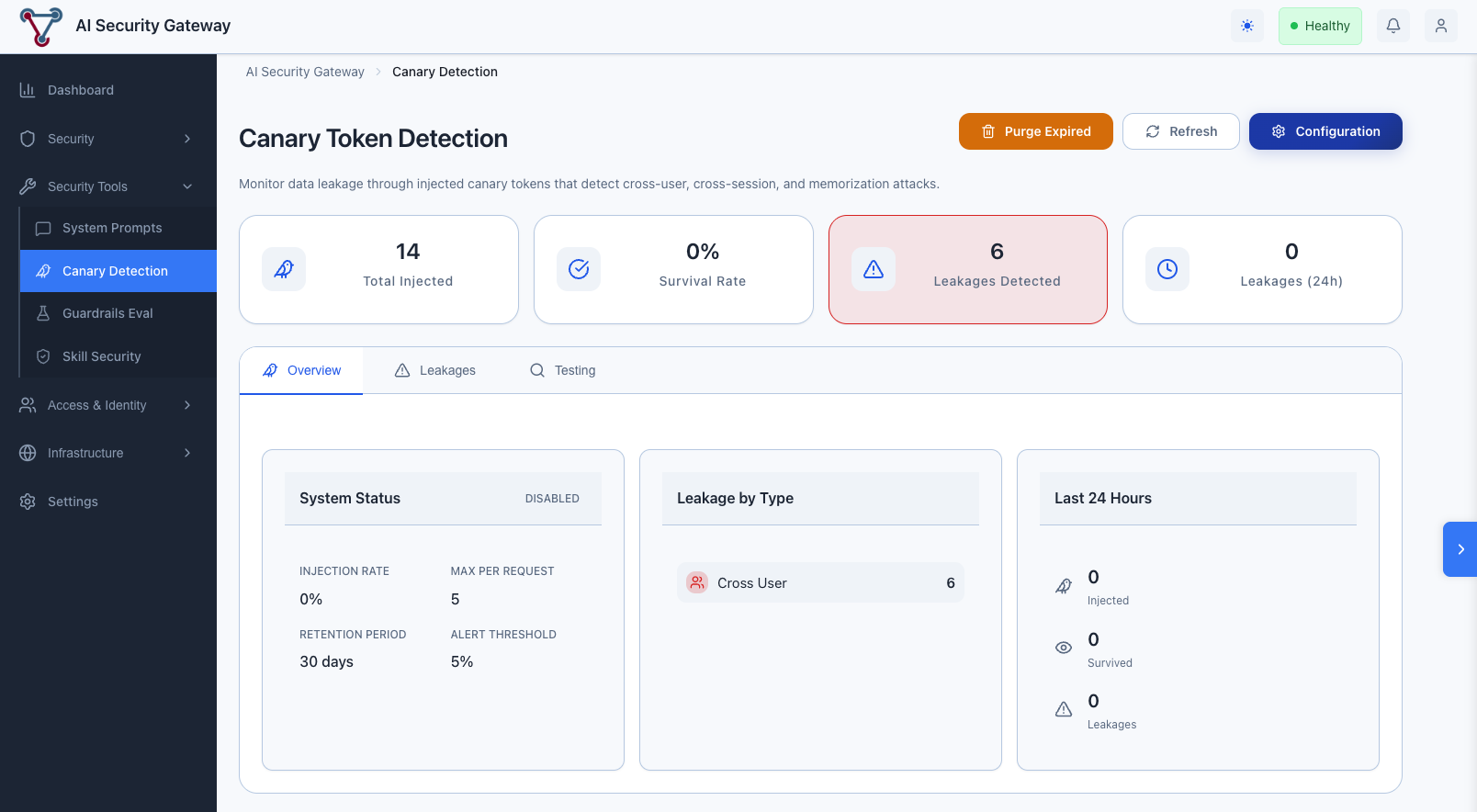
This is a new feature we're experimenting with, so far so good, and feedback would be appreciated!
The Problem It Solves
Modern AI systems can sometimes leak data between users due to:
- Prompt injection attacks that extract other users' data
- Provider-side caching that mixes conversation contexts
- Shared memory or context across sessions
- RAG retrieval that surfaces inappropriate documents
Canary tokens act as invisible tracking markers that help detect these leakage scenarios.
How It Works
- Injection: When a request is processed, a small unique token is automatically embedded into the system prompt or context
- Tracking: The token is registered in the database along with who owns it
- Detection: When processing responses, the system looks for tokens that belong to other users
- Alerting: If a token from user A appears in user B's response, an alert is generated
User A Request → [Token "abc12345" injected] → LLM Provider
                                                    │
                                                    ▼
User B Request → Response contains "abc12345" → ALERT!
                 (Cross-user leakage detected)
Understanding Alerts
Alert Types
| Type | Severity | What It Means |
|---|---|---|
| Cross-User | 🔴 Critical | User A's data appearing in User B's response |
| Cross-Session | 🟡 Medium | Data from one session appearing in another session of the same user |
| Stale Canary | 🟠 High | Very old token appearing (possible memorization by provider) |
What to Do When Leakage is Detected
- Don't Panic: A single alert may be a false positive
- Review Context: Check the leakage details
- Who owned the canary?
- Where was it detected?
- How old was the token?
- Investigate Root Cause:
- Was this a shared context scenario?
- Are users related/same organization?
- Is this a known testing scenario?
- Take Action:
- For confirmed leakage: Check LLM provider configuration
- For repeated patterns: Consider stricter isolation
Configuration Options
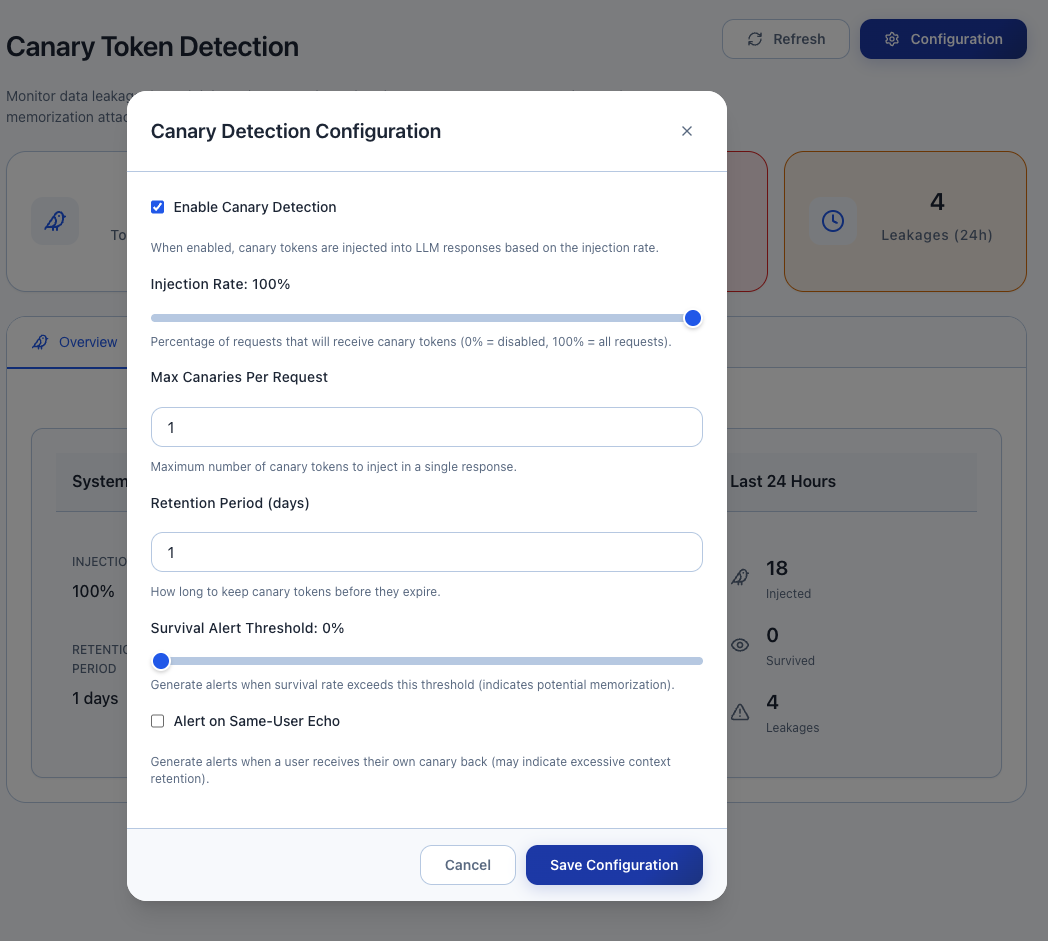
Canary injection is disabled by default.
Basic Settings
| Setting | Default | Description |
|---|---|---|
enabled | true | Turn canary injection on/off |
injection_rate | 1.0 | Percentage of requests to inject (0.0 to 1.0) |
retention_days | 30 | How long to keep canary records |
Example Configurations
Development Environment (full monitoring):
{
  "enabled": true,
  "injection_rate": 1.0,
  "retention_days": 7
}
Production Environment (balanced):
{
  "enabled": true,
  "injection_rate": 0.1,
  "retention_days": 30
}
High-Security Environment:
{
  "enabled": true,
  "injection_rate": 1.0,
  "retention_days": 90,
  "survival_alert_threshold": 0.1
}
Monitoring Dashboard
Key Metrics to Watch
- Injection Count: Total canaries injected over time
- Survival Rate: Percentage of canaries that successfully round-trip
- Low survival may indicate provider-side filtering
- Leakage Count: Number of cross-boundary detections
- Leakage by Type: Breakdown of leakage categories
Health Indicators
| Metric | Healthy | Warning | Critical |
|---|---|---|---|
| Survival Rate | >50% | 20-50% | <20% |
| Leakages/Day | 0 | 1-2 | >2 |
| Cross-User Leakages | 0 | - | Any |
Testing Your Setup
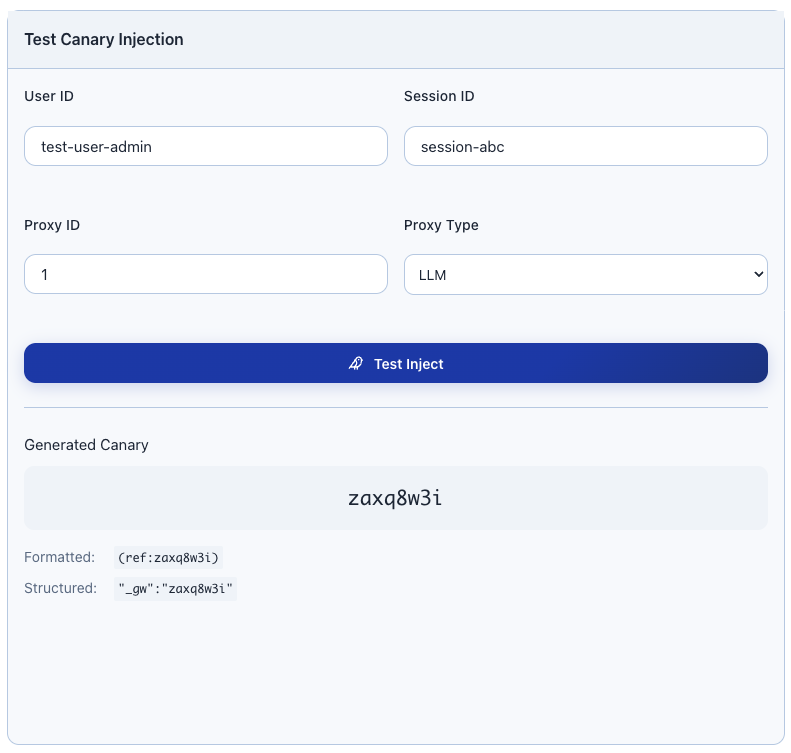
Verify Injection is Working
- Create a test canary:
Simulate Leakage Detection
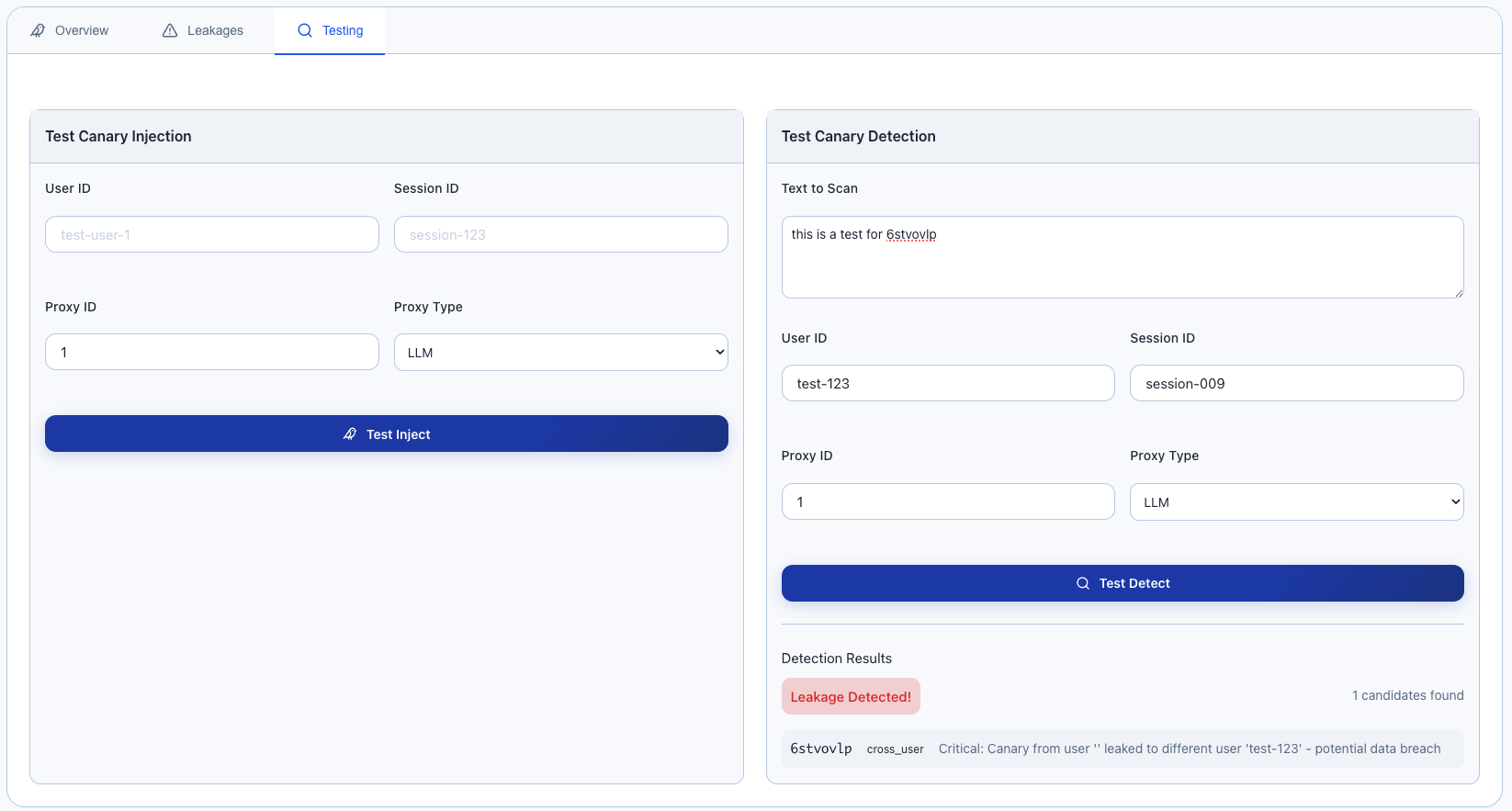
Test detection by simulating a response containing another user's canary:
System Alerts: 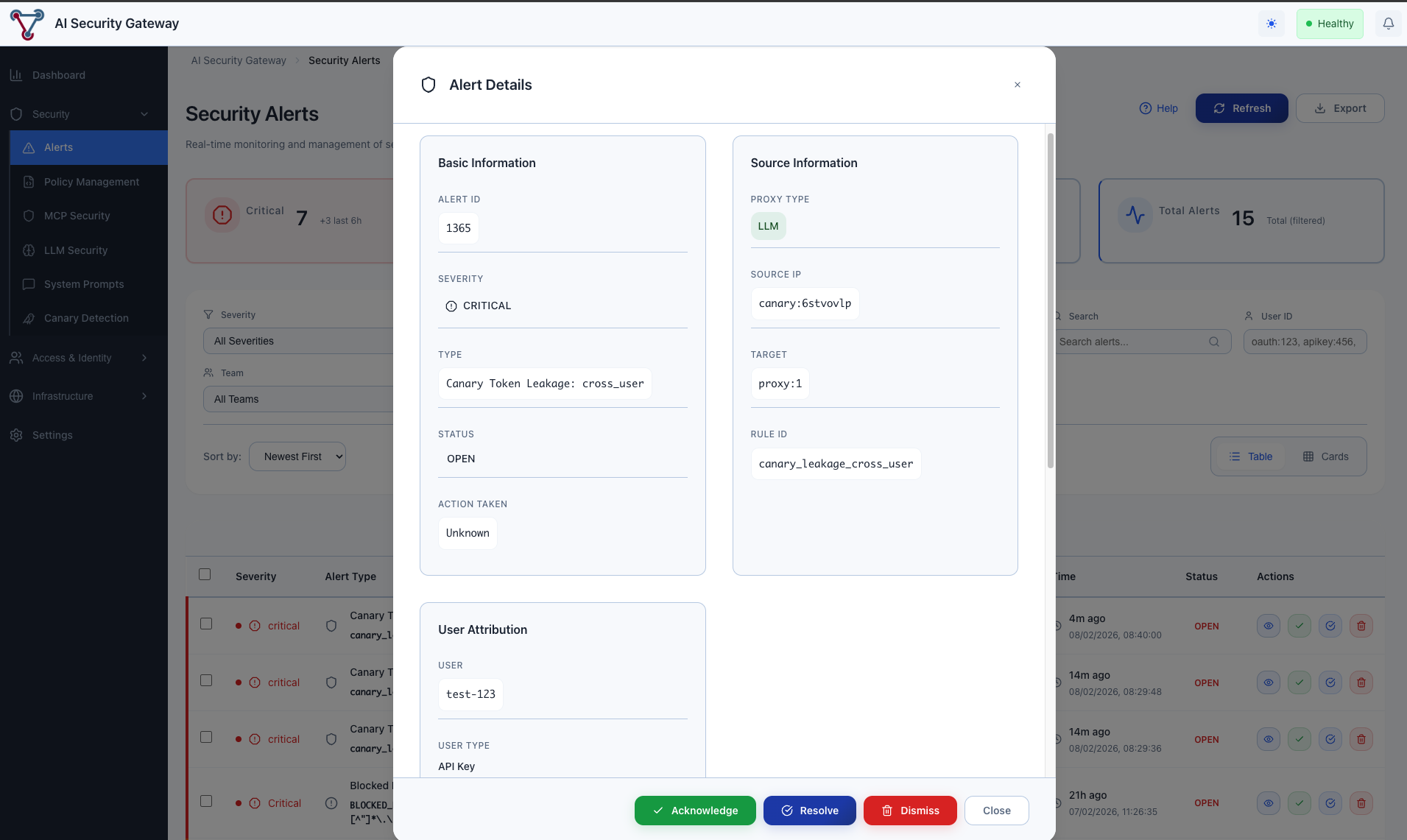
Best Practices
1. Start with Low Injection Rates
Begin with 10% (injection_rate: 0.1) and increase as you verify the system is working correctly.
2. Review Initial Alerts Carefully
The first few alerts may be false positives due to:
- Testing scenarios
- Shared organizational contexts
- Integration testing
3. Set Up Alerting
Configure your monitoring system to alert on:
- Any cross-user leakage (immediate investigation required)
- Sudden increases in any leakage type
- Survival rate drops (may indicate provider issues)
4. Regular Maintenance
- Review leakage reports weekly
- Purge old canaries monthly (automatic with retention settings)
- Verify injection is still working after provider updates
Troubleshooting
"Canaries not being injected"
Check:
- Is canary injection enabled?
- What is the injection rate? (0 = no injection)
- Is the proxy correctly configured with canary service?
"High false positive rate"
Possible causes:
- Users sharing accounts across sessions
- Testing with same user IDs
- Integration tests not using isolated contexts
Solution:
- Use unique user identifiers per actual user
- Configure test environments with separate settings
"Low survival rate"
This means injected canaries aren't appearing in responses.
Possible causes:
- LLM provider filtering/transforming content
- Response truncation
- Content safety filters
Solution:
- Try different canary formats
- Reduce system prompt size
- Check provider documentation for filtering
"Unexpected leakage patterns"
Review the context:
- Are detected users in the same organization?
- Are sessions related (e.g., same user, new browser)?
- Is this expected data sharing?
Privacy Considerations
Data Retention: Canary records include user session identifiers. Configure appropriate retention periods.
Access Control: Limit access to leakage reports to security team members.
Log Redaction: Consider redacting response snippets if they may contain sensitive data.
FAQ
Q: Does this affect response quality? A: No. Canary tokens are designed to be small (~3 tokens) and appear as system metadata that LLMs typically ignore.
Q: Can users see the canary tokens? A: The tokens appear in the system prompt (not visible to end users) and may occasionally appear in raw API responses if not filtered.
Q: What happens if a canary is detected? A: An alert is logged but the response is still delivered. This is by design - we prioritize availability over blocking on potential false positives.
Q: How long should I keep canary records? A: 30 days is typical for most use cases. High-security environments may want 90+ days for forensic purposes.
Q: Can this detect all data leakage? A: No. This is a sampling-based tripwire, not comprehensive DLP. It detects leakage patterns but cannot catch 100% of incidents.