A2A Agent Card Change Monitor
The AI Security Gateway includes agent card change detection capabilities to monitor and identify modifications in A2A agent definitions. This feature provides protection against "rug pull" attacks where a remote agent silently alters its skills, description, capabilities, or URL after registration.
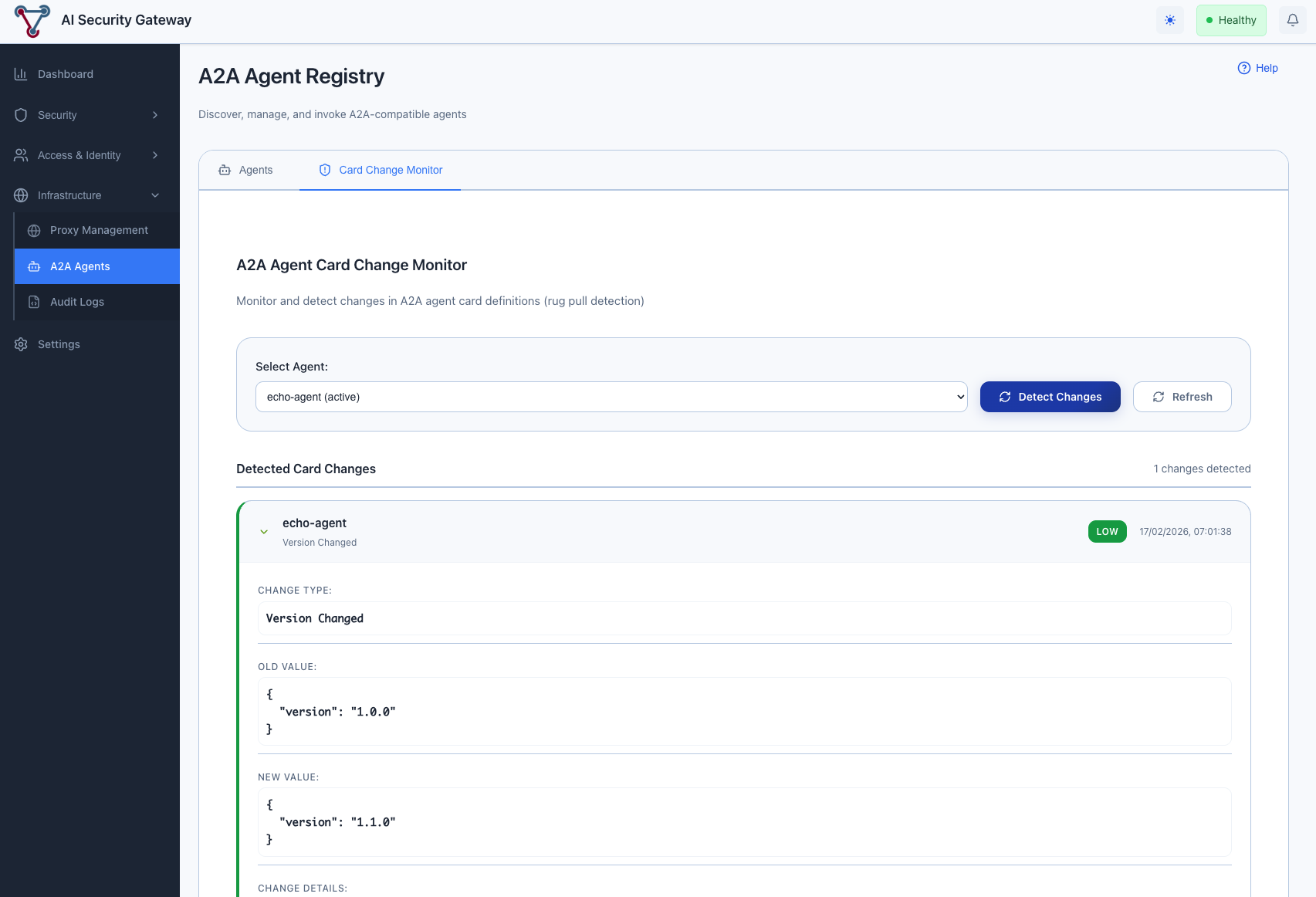
Overview
The A2A Agent Card Change Monitor provides:
- Baseline Protection: Automatic baseline creation when agents are first registered or scanned
- Real-time Detection: Continuous monitoring of Agent Card definitions for unauthorized changes
- Manual Verification: On-demand change detection for immediate security assessment
- Automatic Alerts: Background monitoring with severity-based alert generation
- Historical Tracking: Track agent card evolution and identify suspicious modification patterns
- Rug Pull Defense: Early detection of malicious agent behavior changes
Understanding Agent Card Rug Pull Attacks
What is a Rug Pull Attack? A rug pull attack in the A2A context occurs when:
- An A2A agent initially presents a legitimate Agent Card with safe skills and descriptions
- The gateway registers the agent and users begin trusting and invoking it
- The agent silently modifies its Agent Card to change skills, descriptions, or capabilities
- Users or other agents unknowingly interact with the modified, potentially malicious agent
Why This Matters: Unlike MCP tool changes, an A2A agent card rug pull can redirect traffic to a completely different endpoint (URL change), add skills that trick calling agents into sending sensitive data, or remove safety-related capabilities — all without the gateway noticing unless actively monitored.
Protection Strategy: The Agent Card Change Monitor creates a secure baseline of the complete Agent Card and continuously compares the current card against this baseline to detect unauthorized modifications.
Accessing the Agent Card Change Monitor
To access the A2A Agent Card Change Monitor:
- Navigate to A2A in the main menu
- Click on the "Card Change Monitor" tab
Baseline Creation
Automatic Baseline
When an A2A agent is first scanned for changes, the gateway automatically creates a baseline:
Baseline Components:
- Agent Card Hash: SHA-256 hash of the full Agent Card JSON for integrity verification
- Card Snapshot: Complete Agent Card JSON stored for detailed comparison
- Description: Agent's advertised description
- Skills: Full list of skills with IDs, names, descriptions, and tags
- Version: Agent's reported version string
- Protocol Version: A2A protocol version the agent supports
- URL: The agent's endpoint URL
- Timestamps: First seen and last seen dates for tracking
Baseline Updates
The baseline is updated each time a scan completes. The LastSeen timestamp is refreshed on every scan, and the full snapshot is updated when changes are detected. This means the baseline always reflects the most recently observed state of the agent card.
Manual Change Detection
Step 1: Select Target Agent
The monitor interface provides a dropdown list of all registered A2A agents in your gateway deployment.
Available Information:
- All currently registered A2A agents
- Agent status indicators (active/inactive/maintenance)
Step 2: Review Previous Detection Results
When you select an agent from the dropdown:
- Previous detection results are automatically displayed (if available)
- Change history shows all previously detected modifications with timestamps
- Baseline information shows the current stored baseline for comparison
Step 3: Detect Changes
Click the "Detect Changes" button to initiate a new change detection scan:
- Card Fetch: The gateway re-fetches the Agent Card from the agent's
/.well-known/agent-card.jsonendpoint - Baseline Comparison: The fetched card is compared field-by-field against the stored baseline
- Change Recording: Any detected changes are recorded to the database
- Alert Generation: Alerts are created for each detected change based on severity
- Baseline Update: The baseline is updated to reflect the current state
First Scan Behavior: On the first scan for a new agent, no changes will be reported — the scan establishes the initial baseline. Subsequent scans will detect any modifications from this baseline.
Change Detection Results
The monitor provides detailed analysis of any detected modifications:
Change Types Detected
| Change Type | Description |
|---|---|
| Name Changed | Agent's advertised name was modified |
| Description Changed | Agent's description text was altered |
| URL Changed | Agent's endpoint URL was modified |
| Version Changed | Agent's version string was updated |
| Protocol Version Changed | A2A protocol version was changed |
| Capabilities Changed | Streaming, push notifications, or state history flags changed |
| Skill Added | A new skill appeared in the agent's skill list |
| Skill Removed | A previously available skill was removed |
| Skill Description Changed | An existing skill's description was modified |
| Skill Tags Changed | An existing skill's tags were modified |
Change Details
Each detected change includes:
- Severity Assessment: Critical, High, Medium, or Low rating
- Old Value: The previous value from the baseline
- New Value: The current value from the fetched card
- Change Details: Additional context (e.g., similarity scores, skill names)
- Detection Timestamp: When the change was detected
Background Monitoring
Automatic Change Detection
The AI Security Gateway includes a background monitoring service that periodically scans all active agents:
Continuous Monitoring:
- Scheduled Scans: Periodic agent card change detection at configurable intervals
- Real-time Alerts: Automatic alert creation when changes are detected
- Sequential Scanning: Agents are scanned one at a time to minimize load
- Error Resilience: Failed scans for individual agents don't prevent scanning other agents
Integration with Security Operations:
- Alert System: Changes trigger security alerts visible in the main Alerts dashboard
- Audit Trail: All detected changes are stored in the database for investigation
- Alert Metadata: Alerts include proxy type "a2a", rule IDs like
AGENT_CARD_CHANGE_url_changed, and the "a2a-card-monitor" policy name
Configuration Settings
A2A Monitoring Settings
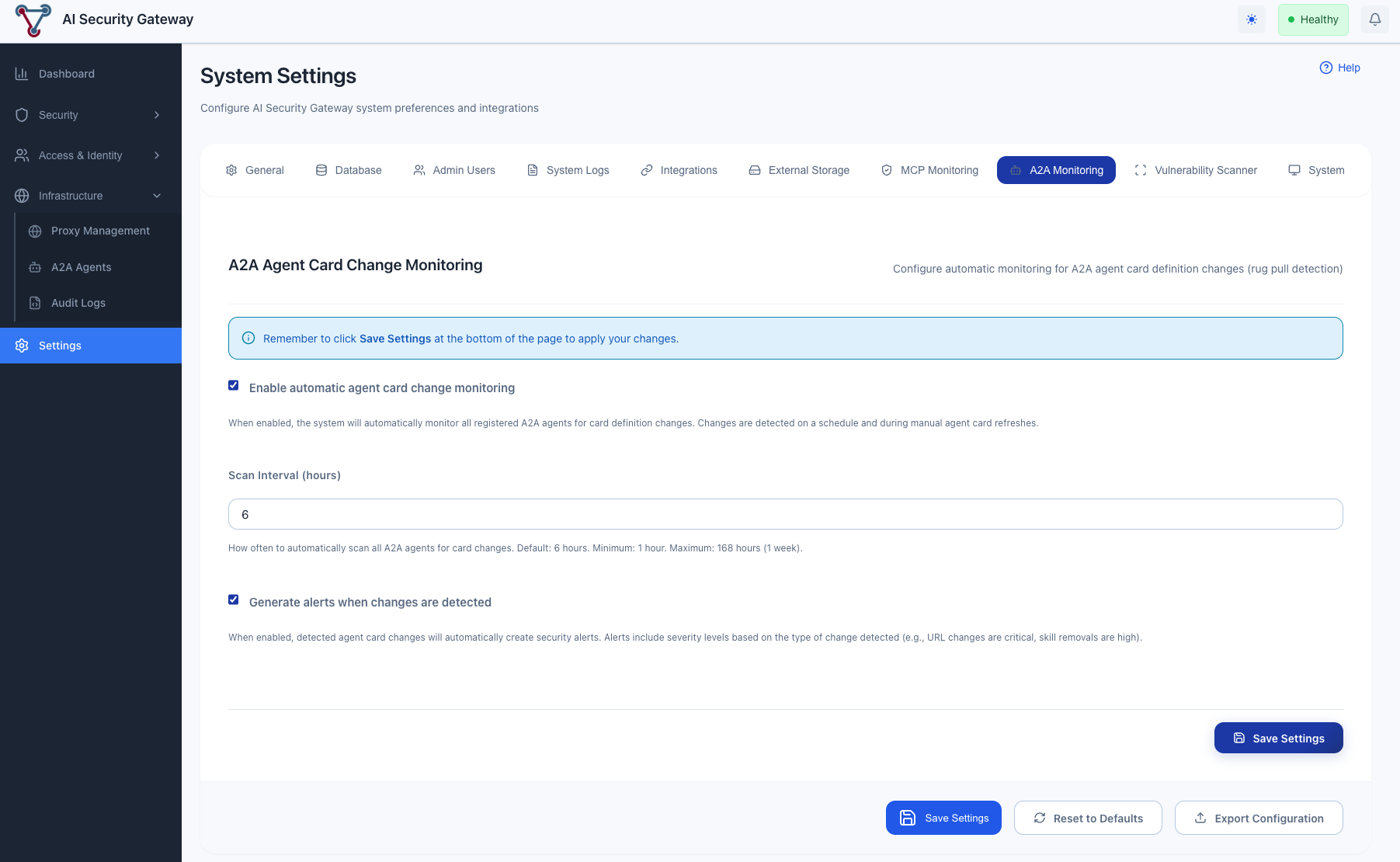
Configure automatic agent card change monitoring under Settings > A2A Monitoring:
Available Configuration Options:
Enable/Disable Monitoring:
- Toggle background change detection on or off
- When disabled, manual detection via the "Detect Changes" button still works
Scan Interval:
- Configure how frequently the background monitor scans agents (in hours)
- Default: 6 hours
- Range: 1 to 168 hours (1 week)
- Can also be set via the
A2A_CARD_SCAN_INTERVAL_HOURSenvironment variable
Alert on Changes:
- Toggle whether detected changes create security alerts
- When enabled, each detected change creates an alert with appropriate severity
- When disabled, changes are still recorded but no alerts are generated
Environment Variables:
A2A_CARD_MONITOR_ENABLED: Set totrueorfalseto control monitoring at startupA2A_CARD_SCAN_INTERVAL_HOURS: Set the scan interval in hours at startup
Understanding Change Severity
Severity Levels
Critical (Immediate Action Required)
- URL changed: The agent's endpoint was redirected — potential traffic hijacking to a malicious server
- Description completely rewritten (similarity < 30%): The agent's identity has fundamentally changed
High (Urgent Investigation)
- Name changed: The agent's identity was altered — possible impersonation
- Protocol version changed: Communication protocol was modified — compatibility and trust implications
- Skill removed: Previously available capabilities were silently dropped
- Description substantially changed (similarity 30-50%): Major rewrite of the agent's purpose
Medium (Review Required)
- Skill added: New capabilities appeared — could be benign updates or capability injection
- Capabilities changed: Streaming, push notifications, or state history flags were toggled
- Major version changed: e.g., version 1.x to 2.x — significant upgrade
- Description moderately changed (similarity 50-70%): Notable rewording
Low (Informational)
- Minor version changed: e.g., version 1.0 to 1.1 — routine update
- Skill tags changed: Metadata tags on skills were modified
- Description slightly changed (similarity > 70%): Minor wording adjustments
- Skill description slightly changed (similarity > 70%): Minor skill description updates
Similarity Scoring
Description and skill description changes use Jaccard word-based similarity to determine severity. The similarity score (0.0 to 1.0) measures the overlap between the old and new text at the word level:
- 1.0: Identical text
- 0.7+: Minor changes (Low severity)
- 0.5-0.7: Moderate changes (Medium severity)
- 0.3-0.5: Substantial changes (High severity)
- < 0.3: Near-complete rewrite (Critical severity)
Best Practices
Monitoring Strategy
Baseline Management:
- Run an initial detection scan on all agents after registration to establish baselines
- After approving legitimate agent updates, the baseline automatically updates on the next scan
- Review baselines periodically to ensure they accurately represent expected agent behavior
Alert Management:
- Investigate critical and high-severity changes immediately — especially URL changes
- Review medium-severity changes during regular security reviews
- Use low-severity changes for trend analysis and audit purposes
- Check the Alerts dashboard regularly for A2A-related alerts
Scan Interval Selection:
- High-security environments: 1-2 hours
- Standard environments: 6 hours (default)
- Low-risk internal agents: 12-24 hours
Security Operations Integration
Incident Response for Agent Card Changes:
- Immediate Assessment: Review the change type and severity
- Verify Legitimacy: Contact the agent operator to confirm the change was intentional
- Risk Analysis: Evaluate whether the change could impact calling agents or data flows
- Containment: Set the agent to "inactive" status if the change is suspicious
- Resolution: Either approve the change (baseline auto-updates on next scan) or remove the agent
Troubleshooting
Common Issues
No Changes Detected on First Scan:
- This is expected behavior. The first scan establishes the baseline. Run a second scan after making changes to see detection results.
"Agent has no URL configured" Error:
- The agent was registered with a manual Agent Card JSON that doesn't include a URL field. The monitor requires a URL to re-fetch the card for comparison.
"Failed to fetch agent card" Error:
- The agent's server is not reachable, or the
/.well-known/agent-card.jsonendpoint is not responding. Verify the agent is running and accessible.
Alerts Not Appearing:
- Check that "Alert on Changes" is enabled in Settings > A2A Monitoring
- Manual detection via the "Detect Changes" button also creates alerts
- Verify the background monitor is enabled if expecting automatic alerts
False Positive Alerts:
- Review change details to distinguish legitimate updates from suspicious modifications
- Consider adjusting scan intervals to align with known agent update schedules
- After confirming a change is legitimate, the baseline will update on the next scan
Monitoring Limitations
Important Considerations:
- Baseline Dependency: Detection accuracy depends on having an established baseline — first scans always create a baseline with no changes reported
- Network Accessibility: Requires connectivity to the agent's
/.well-known/agent-card.jsonendpoint - URL-Based Agents Only: Agents registered with manual JSON and no URL cannot be monitored for remote changes
- Card-Level Detection: Monitors the Agent Card definition only — cannot detect behavioral changes that don't alter the card
- Sequential Scanning: Background scans process agents one at a time, which may introduce delay for large agent registries