Comprehensive Audit Logging
The AI Security Gateway includes enterprise-grade audit logging that tracks all security-sensitive operations for compliance, security monitoring, and incident response.
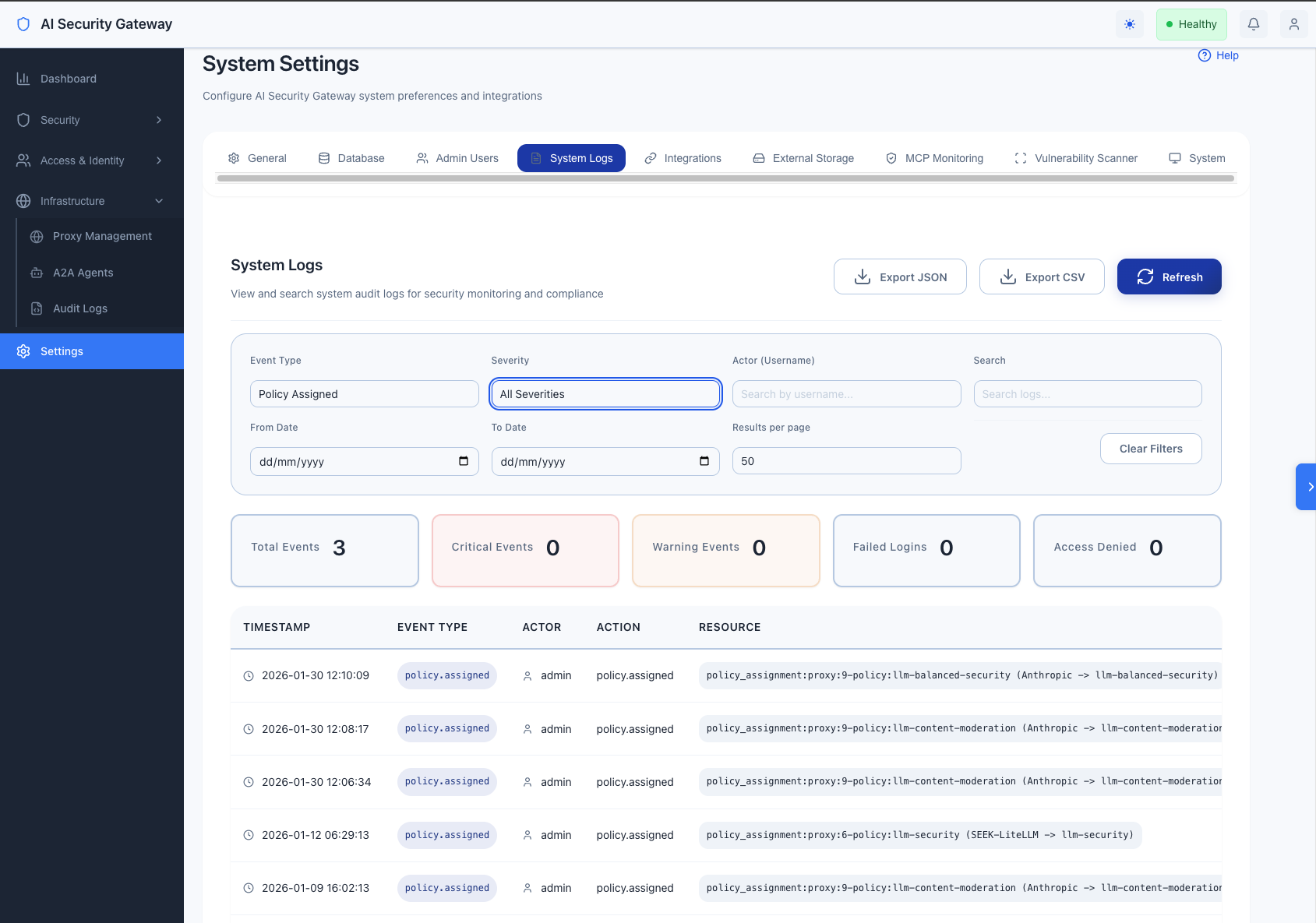
Audit Logging Overview
The audit logging system provides:
- 35+ event types covering authentication, user management, resource operations, and security events
- Structured JSON output for integration with SIEM/SOAR systems
- Complete attribution with user ID, username, email, role, IP address, and user agent
- Severity levels (info, warning, critical) for prioritization
- Compliance ready for SOC 2, HIPAA, GDPR, and PCI DSS requirements
How Audit Logging Works
Core Capabilities
- Automatic Tracking - All security-sensitive operations are automatically logged
- Dual Output - Logs available in both human-readable and JSON formats
- Structured Data - Every event includes timestamp, user details, action, result, and context
- Integration Ready - JSON format designed for SIEM/SOAR system integration
What Gets Logged
Every audit event captures:
- Who: User ID, username, email, role
- What: Action performed and resource affected
- When: Precise timestamp (UTC)
- Where: Source IP address and user agent
- Result: Success, failure, or partial completion
- Why: Context and additional details
- Severity: Info, warning, or critical priority
Event Types
Authentication Events (6 types)
| Event Type | Description | Severity |
|---|---|---|
auth.login | Successful user login | info |
auth.login.failed | Failed login attempt | warning |
auth.logout | User logout | info |
auth.token.refresh | JWT token refresh | info |
auth.password.change | User password change | info |
auth.password.reset | Admin password reset | warning |
Example:
2025-10-28 14:23:45 INFO [audit] [AUDIT] [auth.login] admin (ID:1) auth.login - authentication:admin - Result: success | User logged in successfully with role: admin | IP: 192.168.1.100User Management Events (6 types)
| Event Type | Description | Severity |
|---|---|---|
user.created | New user account created | info |
user.updated | User profile modified | info |
user.deleted | User account deleted | warning |
user.deactivated | User account deactivated | warning |
user.activated | User account reactivated | info |
user.role.changed | User role modified | warning |
Example:
2025-10-28 14:25:30 INFO [audit] [AUDIT] [user.created] admin (ID:1) create user - user:42 (john.doe) - Result: success | Created user 'john.doe' with role 'user' | IP: 192.168.1.100API Key Events (5 types)
| Event Type | Description | Severity |
|---|---|---|
apikey.created | API key generated | info |
apikey.updated | API key modified | info |
apikey.deleted | API key deleted | warning |
apikey.revoked | API key revoked | warning |
apikey.used | API key authenticated | info |
User Group Events (5 types)
| Event Type | Description | Severity |
|---|---|---|
usergroup.created | User group created | info |
usergroup.updated | User group modified | info |
usergroup.deleted | User group deleted | warning |
usergroup.access.added | Member added to group | info |
usergroup.access.removed | Member removed from group | info |
Proxy Lifecycle Events (6 types)
| Event Type | Description | Severity |
|---|---|---|
proxy.created | Proxy configuration created | info |
proxy.updated | Proxy settings modified | info |
proxy.deleted | Proxy configuration removed | warning |
proxy.started | Proxy instance started | info |
proxy.stopped | Proxy instance stopped | info |
proxy.restarted | Proxy instance restarted | info |
Policy Assignment Events (4 types)
| Event Type | Description | Severity |
|---|---|---|
policy.assigned | Security policy assigned to proxy | info |
policy.unassigned | Security policy removed from proxy | info |
policy.bulk.assigned | Multiple policies assigned | info |
policy.assignment.updated | Policy assignment modified | info |
MCP Tool Events (4 types)
| Event Type | Description | Severity |
|---|---|---|
mcp.tool.enabled | MCP tool enabled | info |
mcp.tool.disabled | MCP tool disabled | info |
mcp.tool.bulk.updated | Multiple tools updated | info |
mcp.tool.discovered | Tools discovered from MCP server | info |
OAuth Provider Events (4 types)
| Event Type | Description | Severity |
|---|---|---|
oauth.provider.created | OAuth provider configured | info |
oauth.provider.updated | OAuth provider modified | info |
oauth.provider.deleted | OAuth provider removed | warning |
oauth.session.revoked | OAuth session revoked | warning |
Security Events (4 types)
| Event Type | Description | Severity |
|---|---|---|
security.access.denied | Unauthorized access attempt | critical |
security.input.invalid | Invalid input detected | warning |
security.ratelimit.exceeded | Rate limit violation | warning |
security.suspicious.activity | Suspicious behavior detected | critical |
Log Format
Human-Readable Format
[TIMESTAMP] [LEVEL] [COMPONENT] [AUDIT] [EVENT_TYPE] ACTOR ACTION - RESOURCE - Result: RESULT | DETAILS | IP: SOURCE_IPExample:
2025-10-28 14:23:45 INFO [AI Security Gateway] [audit] [AUDIT] [auth.login] admin (ID:1) auth.login - authentication:admin - Result: success | User logged in successfully with role: admin | IP: 192.168.1.100JSON Format (SIEM Integration)
{
  "event_type": "auth.login",
  "timestamp": "2025-10-28T14:23:45Z",
  "severity": "info",
  "actor": {
    "user_id": 1,
    "username": "admin",
    "email": "admin@localhost",
    "role": "admin",
    "type": "user"
  },
  "resource": {
    "type": "authentication",
    "id": "admin",
    "name": ""
  },
  "action": "auth.login",
  "result": "success",
  "details": "User logged in successfully with role: admin",
  "metadata": {},
  "source_ip": "192.168.1.100",
  "user_agent": "Mozilla/5.0...",
  "error_message": ""
}
Audit Logging Usage Examples
Querying Audit Logs
Find all failed login attempts
grep "auth.login.failed" logs/ai-security-gateway.logTrack actions by specific user
grep "admin (ID:1)" logs/ai-security-gateway.log | grep AUDITFind critical security events
grep "CRITICAL" logs/ai-security-gateway.log | grep AUDITList all password changes
grep "auth.password.change" logs/ai-security-gateway.logFind proxy lifecycle events
grep -E "(proxy.started|proxy.stopped|proxy.restarted)" logs/ai-security-gateway.logExport audit logs to JSON
grep "AUDIT_JSON" logs/ai-security-gateway.log | jq '.'Monitoring Patterns
Failed Login Detection
# Alert on 5+ failed logins from same IP
grep "auth.login.failed" logs/ai-security-gateway.log | \
  awk '{print $NF}' | sort | uniq -c | awk '$1 >= 5'
Privilege Escalation Detection
# Monitor role changes
grep "user.role.changed" logs/ai-security-gateway.log
After-Hours Activity
# Find activity outside business hours (assuming UTC)
grep "AUDIT" logs/ai-security-gateway.log | \
  awk '{if ($2 < "08:00:00" || $2 > "18:00:00") print}'
Audit Logging Integration
SIEM Integration
Audit logs are designed for easy integration with Security Information and Event Management (SIEM) systems:
Supported Integration Methods:
- Splunk - HTTP Event Collector (HEC)
- Elastic Stack - Filebeat/Logstash pipeline
- AWS CloudWatch - Log streaming
- Azure Monitor - Log Analytics workspace
- QRadar - Syslog/REST API
Setup: Configure external log storage in Settings → Integrations section of the web UI.
Webhook Notifications
Configure real-time webhooks for critical security events:
- Navigate to Settings → Integrations → Webhooks
- Add webhook URL (Slack, Teams, custom endpoint)
- Select event types to trigger notifications:
- Failed login attempts
- Access denied events
- Privilege escalation
- Configuration changes
- Choose severity levels (info, warning, critical)
Audit Log Aggregation
For centralized log management, audit logs can be forwarded to:
Elastic Stack (ELK)
- Use Filebeat to collect and forward logs
- Filter by
log_type: auditfor audit-specific events - Configure multiline patterns for structured parsing
Splunk
- Create a dedicated audit log index
- Use sourcetype for audit events
- Set up dashboards for compliance reporting
Configuration: Set up log forwarding in Settings → Integrations in the web UI.
Compliance Use Cases
SOC 2 Type II
- ✅ Administrative access logging (auth.login, auth.logout)
- ✅ Configuration change tracking (proxy., policy., user.*)
- ✅ Access control logging (security.access.denied)
- ✅ Audit log integrity (structured format, timestamps)
Audit System HIPAA
- ✅ User access logging (auth.*)
- ✅ PHI access tracking (via proxy audit logs)
- ✅ Administrative actions (user., policy.)
- ✅ Security incident logging (security.*)
Audit System GDPR
- ✅ Data access logging (user., apikey.)
- ✅ Data modification tracking (user.updated, user.deleted)
- ✅ Consent management (oauth.*)
- ✅ Right to be forgotten (user.deleted audit trail)
Audit System PCI DSS
- ✅ User identification and authentication (auth.*)
- ✅ Access control measures (security.access.denied)
- ✅ Audit trail for all access to cardholder data
- ✅ Security policy enforcement (policy.*)
Audit Logging Implementation Best Practices
1. Log Retention
The AI Security Gateway supports granular retention policies for different data types, allowing you to configure retention periods independently for alerts, audit logs, request logs, token usage, and more.
Configuring Retention Policies
Configure retention via the web UI:
- Navigate to Settings → Database → Advanced Retention Settings
- Set retention periods for each data type:
- Security Alerts: 180 days (recommended)
- Audit Logs: 90 days (compliance standard)
- Request Logs: 30 days (privacy-focused)
- Token Usage: 365 days (annual cost tracking)
- Health Metrics: 30 days (operational monitoring)
- MCP Tool Logs: 90 days (same as audit logs)
- LLM Request Logs: 90 days (same as audit logs)
- A2A Invocation Logs: 90 days (same as audit logs)
- Click Save to apply changes
Recommended Retention Periods
- Security Alerts: 90-180 days (compliance/forensics)
- Audit Logs: 90 days (compliance requirements)
- Request Logs: 30 days (privacy - shorter retention)
- Token Usage: 365 days (annual cost analysis)
- Health Metrics: 30 days (operational monitoring)
- MCP/LLM/A2A Logs: 90 days (same as audit logs)
Automatic Cleanup
- Cleanup runs daily at midnight
- Old records are automatically deleted based on retention policy
- Token usage records are now automatically cleaned up (previously missing)
- Changes to retention settings take effect on the next cleanup cycle
2. Log Analysis
# Daily security review
./scripts/audit-report.sh --date $(date +%Y-%m-%d) --critical
3. Alert Configuration
- Set up alerts for critical events (security.access.denied)
- Monitor failed login patterns (auth.login.failed)
- Track privilege escalation (user.role.changed)
4. Regular Audits
- Weekly: Review critical events
- Monthly: Analyze user activity patterns
- Quarterly: Compliance audit reports
5. Incident Response
- Filter logs by time range and user
- Export audit trail to JSON
- Analyze event sequence
- Generate incident report
Audit Logging Performance Considerations
- Minimal Overhead: Async logging prevents blocking
- Structured Format: Efficient parsing for analysis
- Log Levels: Filter by severity in production
- Retention: Implement log rotation and archival
Audit Logging Implementation Troubleshooting
Missing Audit Logs
# Check log file permissions
ls -la logs/ai-security-gateway.log

# Verify audit service is initialized
grep "Audit service created" logs/ai-security-gateway.log
High Log Volume
# Check log size
du -h logs/ai-security-gateway.log

# Filter by severity
grep "CRITICAL\|WARN" logs/ai-security-gateway.log
Parsing Errors
# Validate JSON format
grep "AUDIT_JSON" logs/ai-security-gateway.log | jq empty
Audit Logging Future Enhancements
- Database Audit Trail - Store audit events in database for querying
- Real-time Dashboards - Vue.js audit log viewer
- Advanced Alerting - Machine learning for anomaly detection
- Compliance Reports - Automated report generation
- External Integrations - Direct SIEM/SOAR connectors
Related Documentation
- Settings Configuration: See System Settings Guide
- SIEM Integration: See Integration Setup Guide
- Compliance: See Compliance Overview
- External Reference: OWASP Logging Cheat Sheet