MCP Tool Change Monitor
The AI Security Gateway includes advanced tool change detection capabilities to monitor and identify modifications in MCP server tool definitions. This feature provides protection against "rug pull" attacks where malicious actors alter MCP tool behavior after gaining user trust.
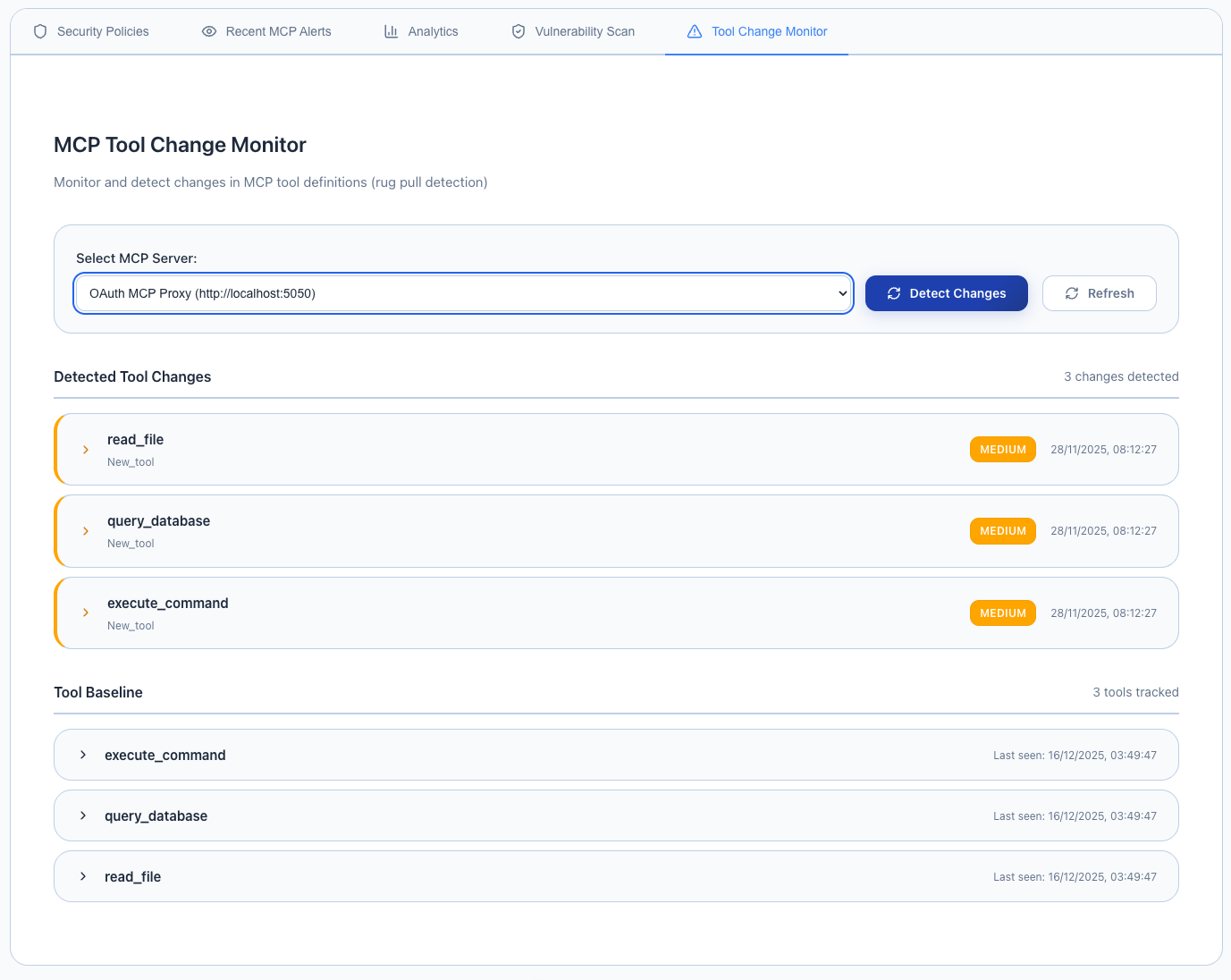
Overview
The MCP Tool Change Monitor provides:
- Baseline Protection: Automatic baseline creation when MCP proxies are first configured
- Real-time Detection: Continuous monitoring of tool definitions and functionality changes
- Manual Verification: On-demand change detection for immediate security assessment
- Automatic Alerts: Background monitoring with alert generation for detected changes
- Historical Tracking: Track tool evolution and identify suspicious modification patterns
- Rug Pull Defense: Early detection of malicious tool behavior changes
Understanding Rug Pull Attacks
What is a Rug Pull Attack? A rug pull attack occurs when:
- An MCP server initially presents legitimate, safe tools
- Users begin trusting and using the server
- The server maliciously modifies tool behavior to perform harmful actions
- Users unknowingly execute the modified, malicious tools
Protection Strategy: The Tool Change Monitor creates a secure baseline of all tool definitions and continuously compares current tools against this baseline to detect unauthorized modifications.
Accessing the Tool Change Monitor
To access the MCP Tool Change Monitor:
- Navigate to Security in the main menu
- Select MCP Security from the dropdown
- Click on the "Tool Change Monitor" tab
Baseline Creation
Automatic Baseline
When an MCP server proxy is first configured in the AI Security Gateway:
Automatic Process:
- Tool Discovery: Complete enumeration of available tools
- Definition Capture: Detailed recording of tool schemas, parameters, and descriptions
- Functionality Mapping: Documentation of expected tool behavior patterns
- Signature Creation: Cryptographic signatures for tool integrity verification
- Baseline Storage: Secure storage of baseline data for future comparison
Baseline Components:
- Tool names and descriptions
- Input parameter schemas
- Output format definitions
- Permission requirements
- Resource access patterns
Manual Change Detection
Step 1: Select Target MCP Server
The monitor interface provides a dropdown list of all configured MCP servers in your AI Security Gateway deployment.
Available Options:
- All currently configured MCP proxy instances
- Server status indicators (online/offline)
- Last change detection timestamp (if previously scanned)
- Baseline creation date and version
Step 2: Review Previous Detection Results (Optional)
When you select an MCP server from the dropdown:
- Previous detection results are automatically displayed (if available)
- Last scan timestamp shows when the last change detection was performed
- Change summary provides overview of any modifications found
- Baseline comparison shows current vs. original tool definitions
Step 3: Detect Changes
Click the "Detect Changes" button to initiate a new change detection scan:
- Real-time Analysis: Live comparison against established baseline
- Comprehensive Checking: Verification of all tool definitions and parameters
- Immediate Results: Instant notification of any detected changes
- Alert Generation: Automatic alert creation for significant modifications
Change Detection Results
The monitor provides detailed analysis of any detected modifications:
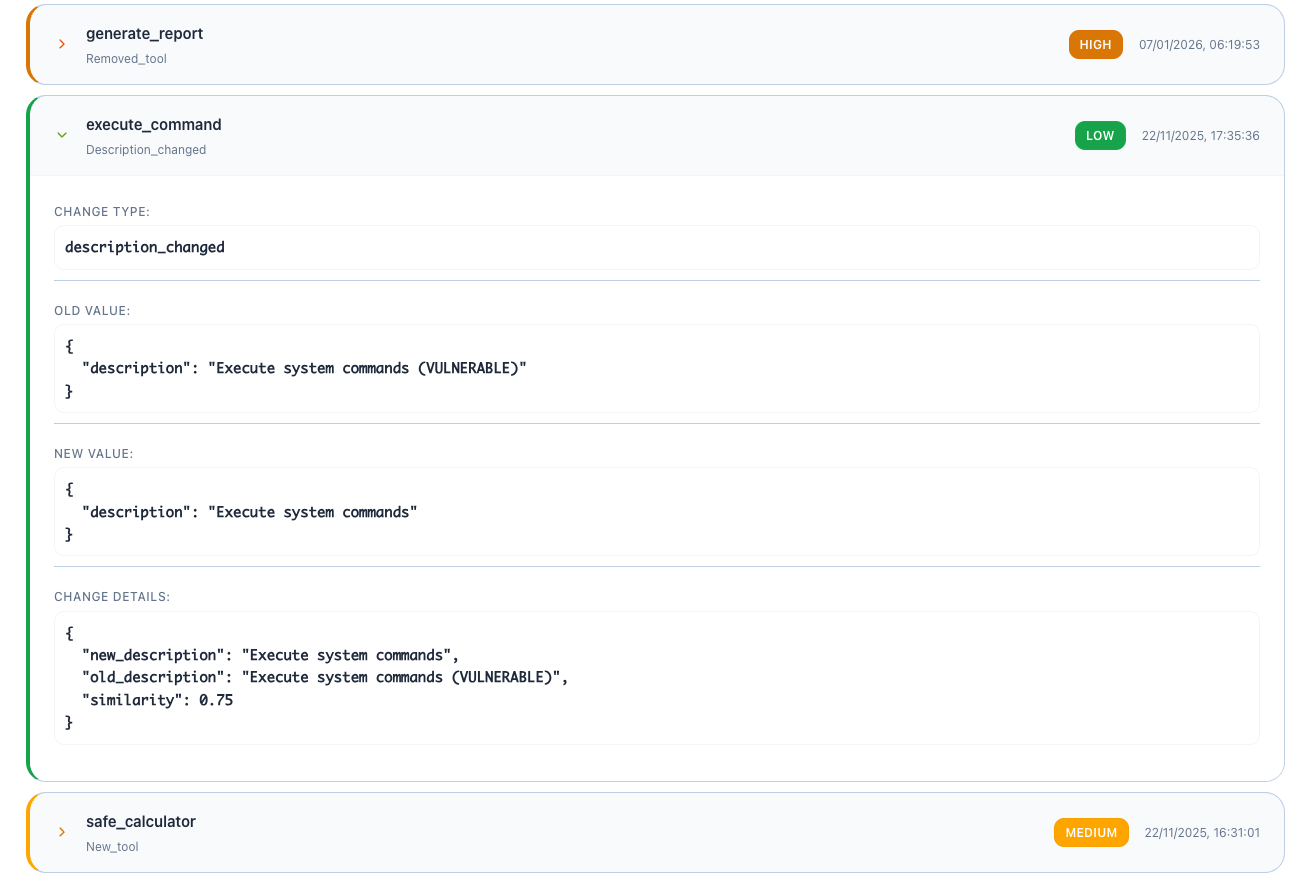
Detection Results Include:
Change Categories:
- New Tools: Tools added since baseline creation
- Removed Tools: Tools that are no longer available
- Modified Definitions: Changes to existing tool schemas or descriptions
- Parameter Changes: Modifications to input/output parameters
- Permission Changes: Alterations to required permissions or access levels
- Behavioral Changes: Detected differences in tool execution patterns
Change Details:
- Severity Assessment: Critical, High, Medium, Low risk rating
- Modification Type: Addition, removal, or alteration
- Comparison View: Before/after comparison of tool definitions
- Risk Analysis: Potential security implications of detected changes
- Recommendation: Suggested actions for addressing the changes
Detection Metadata:
- Scan Duration: Time taken to complete the change detection
- Baseline Version: Version of baseline used for comparison
- Detection Timestamp: When the change detection was performed
- Change Count: Total number of modifications identified
Background Monitoring
Automatic Change Detection
The AI Security Gateway includes a background monitoring service that:
Continuous Monitoring:
- Regular Scans: Periodic tool change detection during normal operation
- Real-time Alerts: Immediate notification when changes are detected
- Trend Analysis: Identification of patterns in tool modifications
- Risk Escalation: Automatic severity assessment and alert prioritization
Integration with Security Operations:
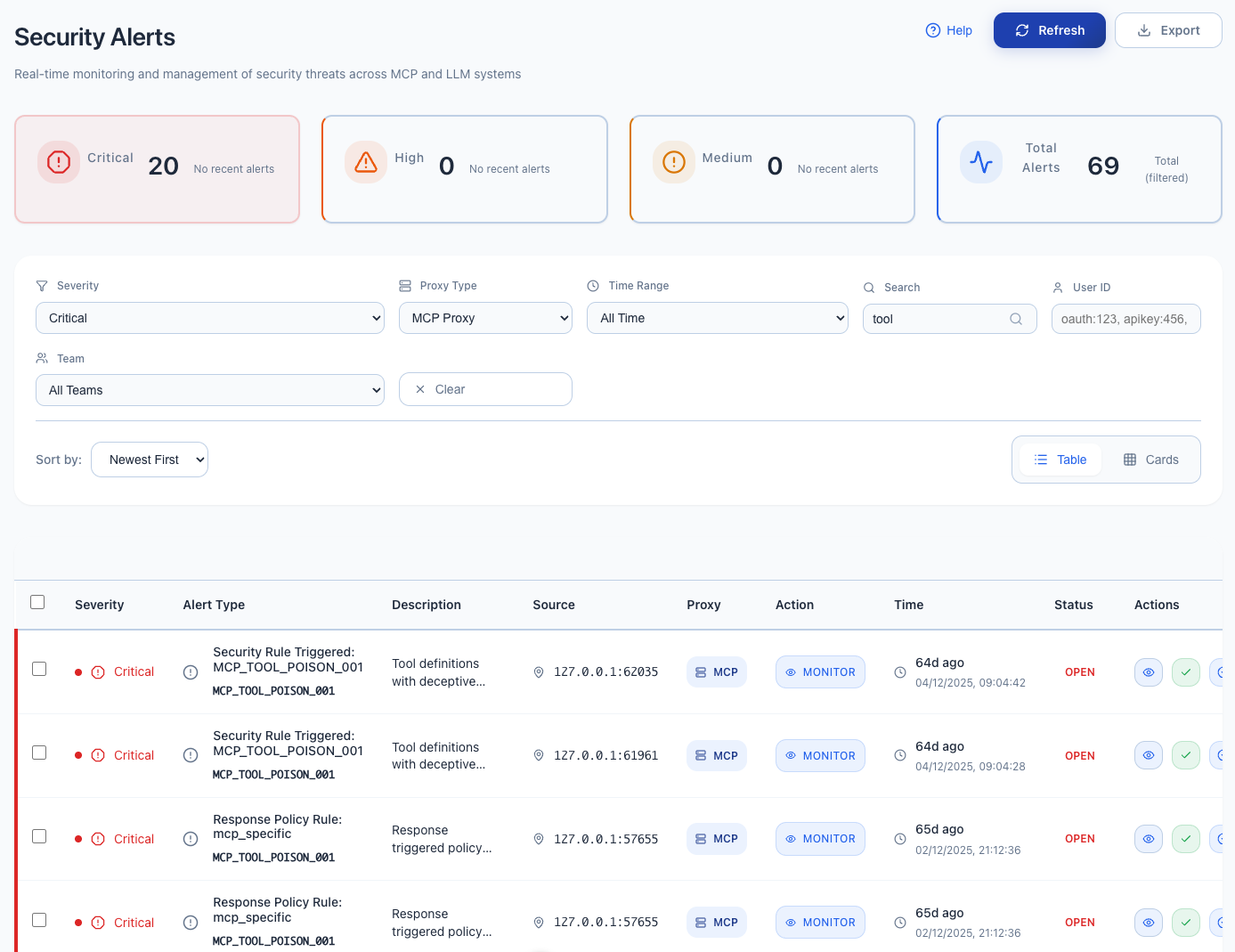
- Alert System: Changes trigger security alerts in the main dashboard
- Audit Logging: All detected changes are logged for compliance and investigation
- Policy Enforcement: Automatic blocking of proxies with suspicious changes (configurable)
- Notification Systems: Integration with SIEM, SOAR, and messaging platforms
Configuration Settings
MCP Monitoring Settings
Configure automatic tool change monitoring under Settings → MCP Monitoring:
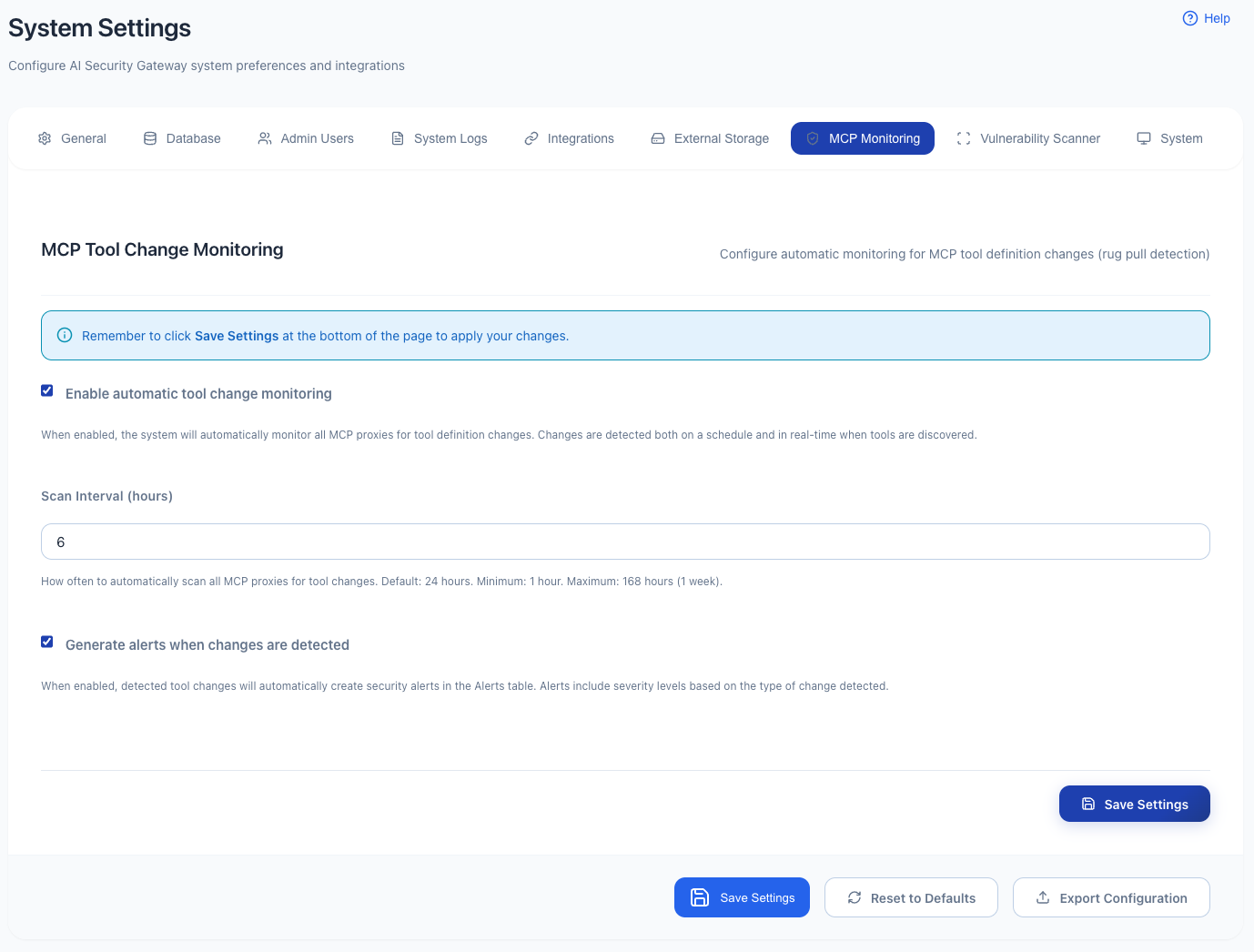
Available Configuration Options:
Enable/Disable Monitoring:
- Automatic Monitoring: Toggle background change detection on/off
- Per-Proxy Control: Enable monitoring for specific MCP servers only
- Alert Generation: Control whether changes trigger security alerts
- Audit Logging: Configure logging level for change detection events
Scan Intervals:
- Rapid Monitoring: Every 5 minutes (high-security environments)
- Standard Monitoring: Every 30 minutes (recommended default)
- Periodic Monitoring: Every 2 hours (low-risk environments)
- Custom Intervals: User-defined monitoring frequency
Alert Thresholds:
- Critical Changes: Tool removal or major permission escalation
- Significant Changes: New tools or modified tool behavior
- Minor Changes: Description updates or cosmetic modifications
- Noise Reduction: Filter out benign changes to reduce alert fatigue
Response Actions:
- Alert Only: Generate alerts but continue allowing proxy traffic
- Quarantine: Temporarily disable proxy while investigating changes
- Block: Permanently disable proxy until manual review and approval
- Notify: Send notifications to security team without disrupting service
Understanding Change Severity
Severity Levels
Critical (Immediate Action Required)
- Tool removal that eliminates safety features
- Permission escalation to system-level access
- Introduction of tools with dangerous capabilities
- Modification of authentication or authorization mechanisms
High (Urgent Investigation)
- Addition of new tools with broad system access
- Significant changes to existing tool functionality
- Modifications to security-related parameters
- Changes that could facilitate data exfiltration
Medium (Review Required)
- Addition of new tools with limited scope
- Minor modifications to existing tool behavior
- Changes to tool descriptions or metadata
- Alterations that don't directly impact security
Low (Informational)
- Cosmetic changes to tool descriptions
- Version updates with no functional changes
- Documentation improvements
- Benign parameter additions or modifications
Best Practices
Monitoring Strategy
Baseline Management:
- Regular Updates: Update baselines for legitimate tool evolution
- Version Control: Maintain historical baselines for forensic analysis
- Validation: Verify baseline integrity after updates
- Documentation: Record approved changes and their business justification
Alert Management:
- Rapid Response: Investigate critical and high-severity changes immediately
- Trend Analysis: Look for patterns in tool modifications across servers
- False Positive Reduction: Fine-tune alerting thresholds based on environment
- Escalation Procedures: Define clear escalation paths for different change types
Security Operations Integration
Incident Response:
- Immediate Assessment: Evaluate the nature and scope of detected changes
- Risk Analysis: Determine potential security implications
- Containment: Isolate affected proxies if necessary
- Investigation: Analyze the root cause of tool modifications
- Resolution: Apply appropriate remediation or approve legitimate changes
Compliance and Governance:
- Change Documentation: Maintain records of all tool modifications
- Approval Workflows: Implement formal approval processes for tool changes
- Risk Assessment: Regular evaluation of tool change patterns and trends
- Policy Updates: Adjust monitoring policies based on operational experience
Troubleshooting
Common Issues
False Positive Alerts:
- ✅ Review change details to distinguish legitimate from suspicious modifications
- ✅ Adjust alert thresholds to reduce noise from benign changes
- ✅ Update baselines after confirming legitimate tool evolution
- ✅ Implement change approval workflows for known modifications
Missed Changes:
- ✅ Verify monitoring is enabled for all relevant MCP servers
- ✅ Check scan intervals are appropriate for your security requirements
- ✅ Ensure network connectivity between gateway and MCP servers
- ✅ Review baseline integrity and update if corrupted
Performance Impact:
- ✅ Optimize scan intervals based on server capacity and security needs
- ✅ Consider disabling monitoring for low-risk, internal MCP servers
- ✅ Implement monitoring schedules during low-traffic periods
- ✅ Use selective monitoring for specific tool categories only
Monitoring Limitations
Important Considerations:
- Baseline Dependency: Detection accuracy depends on comprehensive initial baselines
- Network Accessibility: Requires consistent connectivity to monitored MCP servers
- Legitimate Changes: May generate alerts for authorized tool updates
- Behavioral Analysis: Cannot detect malicious behavior that doesn't change tool definitions